
Format: Product craft · Research
Arcos Control Tower and Arcos Field: A Platform Built Around the Storm
Building a research-backed vision for emergency preparedness, and holding that vision through the constraints of a real product launch
Arcos planned to give its legacy emergency preparedness tools a modern UI, a vision set before I joined with little research behind it. Storm restoration is a sequence handed from role to role, and every tool did one job.
- My part
- I led UX and the research. Erin Gold and I built the service blueprint from the kickoff, and from my first four to five months of evidence I brought the workflow-based vision. I developed user lenses, created every Control Tower prototype, designed the first-release screens on both sides, and later led 2.5 months of fieldwork across 14 AEP sites.
- The team’s part
- Slalom consultants Erin Gold (strategy) and Steve Herring (design production and operations) worked the research and design with me. Product managers and designers shaped the prototype. Oswaldo Vazquez, Ales Karoza, and I each built a version of Mark 3. Executive and product leadership made the scope cuts.
- Status
- Shipped
- Timeline
- ~10 months to the first release
Outcome
The first release shipped on schedule in August 2025, after two rounds of scope cuts: convoy tracking on the desktop and in Arcos Field on the phone, at the same time.
Tags & related work
Selected research account
This selected retrospective account is separate from the authored story. It does not establish every claim, artifact credit, release status or image permission on this page.
Jason Sonderman led UX field research in the ARCOS platform experience work.
Account scope: scope: Leadership is not sole research authorship. Counts and a research interval are not approved by this contribution.
Account context and references
Attribution: Jason Sonderman. Jason Sonderman led UX field research in the ARCOS platform experience work. Leadership is not sole research authorship. Counts and a research interval are not approved by this contribution.
Project scope: scope: Curated account excerpt; not the full legacy page, raw evidence or an independently audited outcome.
Selected profile: Jason Sonderman. scope: Scoped professional account; no unreviewed employment titles, tenure, credentials or contact fields.
Work context: Arcos, Inc: UX field research and Control Tower/mobile design leadership. scope: Scoped work description, not a confirmed employment title or employment period.
Capability association: Field research leadership: Research with operating users in their work context. Editorial association with the selected historically confirmed activity; not a verified proficiency score. scope: Do not convert reported research scope to independently audited sample or sole authorship.
Evidence account: Jason Sonderman. Jason Sonderman led UX field research in the ARCOS platform experience work. scope: No site=company substitution, exact sample definition,2.5-month interval or causal proof. uncertainty: Support assessment proposed for this selected statement only; original employer artifact/report not independently inspected. No image or diagram supplied.
Source availability: Jason Sonderman retrospective account, with the required statement-specific limitations. uncertainty: Retrospective account; original employer records not independently inspected. Private source material is not provided by this API. Original source URL: not publicly available.
- Profile: pro_jason, revision 1; selected context: exp_arcos; selected capability: cap_research.
- Project: prj_controltower, revision 1; experience: exp_arcos, revision 2; capability: cap_research, revision 1.
- Assertion: CT-AR-01, revision 1; kind: personal_contribution; attribution scope: personal_with_limits; verification: historically_confirmed_not_independently_verified.
- Evidence: evd_controltoweraccount, revision 1; kind: account; support assessment: supports; supports: CT-AR-01; attribution scope: qualified_retrospective_account.
- Capability link: CT-AR-01, evd_controltoweraccount, editorial_association.
- Source: src_controltoweraccount, revision 1; kind: account; availability: not_publicly_available; public_url: null.
- Projection revision: r_5dd98d79d429a73f252b7d8b2205b657b8962e9a5ff157d87fbacfb72e2ec638.
The short version
Understand
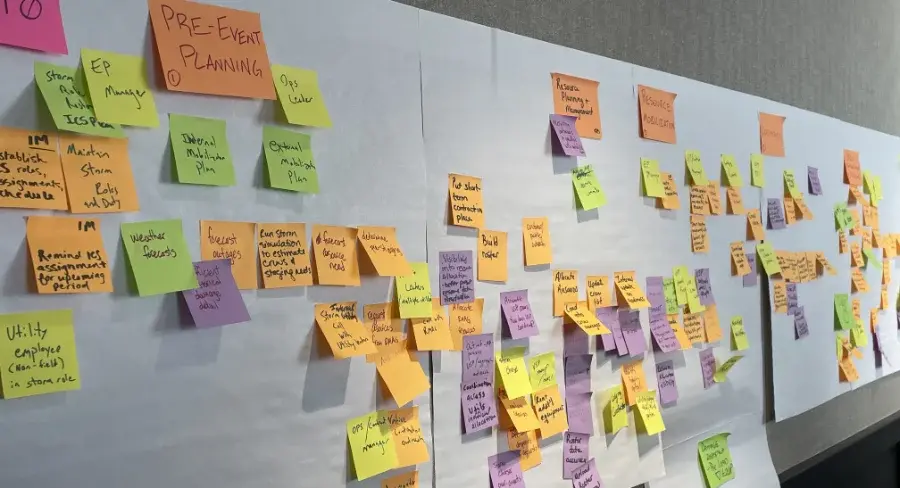
I joined Arcos in October 2024, at the platform’s two-day kickoff, with a plan already in motion: a modern UI for the legacy storm tools, set with little research behind it. Fifteen people from Arcos and Slalom spent those two days defining goals and personas from gathered data. Erin Gold, a Slalom consultant, and I turned the kickoff’s sticky notes into a service blueprint of storm restoration.
Discovery in sticky notes: the storm process mapped phase by phase, starting with pre-event planning. Raw material for the service blueprint. Reframe
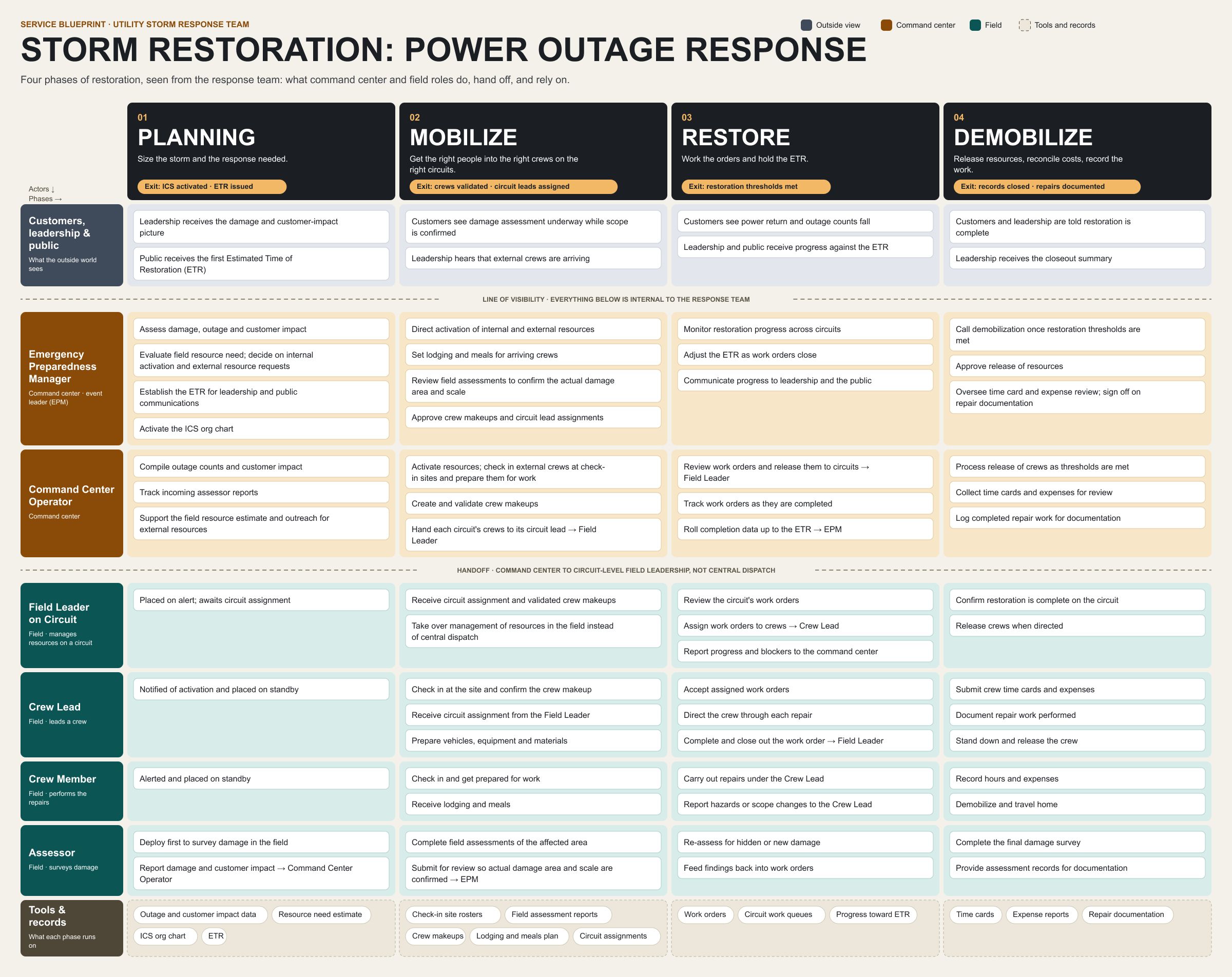
The blueprint showed the trouble: storm restoration is a sequence handed from role to role, and every tool did one job. From that and the rest of my first four to five months, before any convoy tracking designs, I recommended a workflow-based platform instead of a UI refresh, one built to follow the sequence of a storm response.
Recreated.The storm restoration process as a service blueprint: four phases, and what each role does, hands off, and relies on in each. Redrawn for this page from the blueprint Erin Gold and I built from the kickoff. Envision
Evidence alone doesn’t align a team, so I made the future tangible. “User lenses” let the platform adapt to a person’s role, starting with Mark 1, an early vision. I built it out as a working Lovable prototype with product managers and designers, then created Mark 2, the testable Command Center prototype, which Storm Response Advisory Committee leaders tested.
- Mark 1 · early vision, created by me
- Mark 2 · prototype, created by me
- Mark 3 · near-final, senior designers and me
Reconstruction.Three marks of the Command Center. Mark 1 was my early vision, before the prototyping. Mark 2 is the testable prototype I created, which Storm Response Advisory Committee leaders tested. Mark 3, the near-final design, was built in three versions by Oswaldo Vazquez, Ales Karoza, and me. All three are captures of a rebuild I made after leaving Arcos, from my original prototype and my last design files, with fictional data. Organize
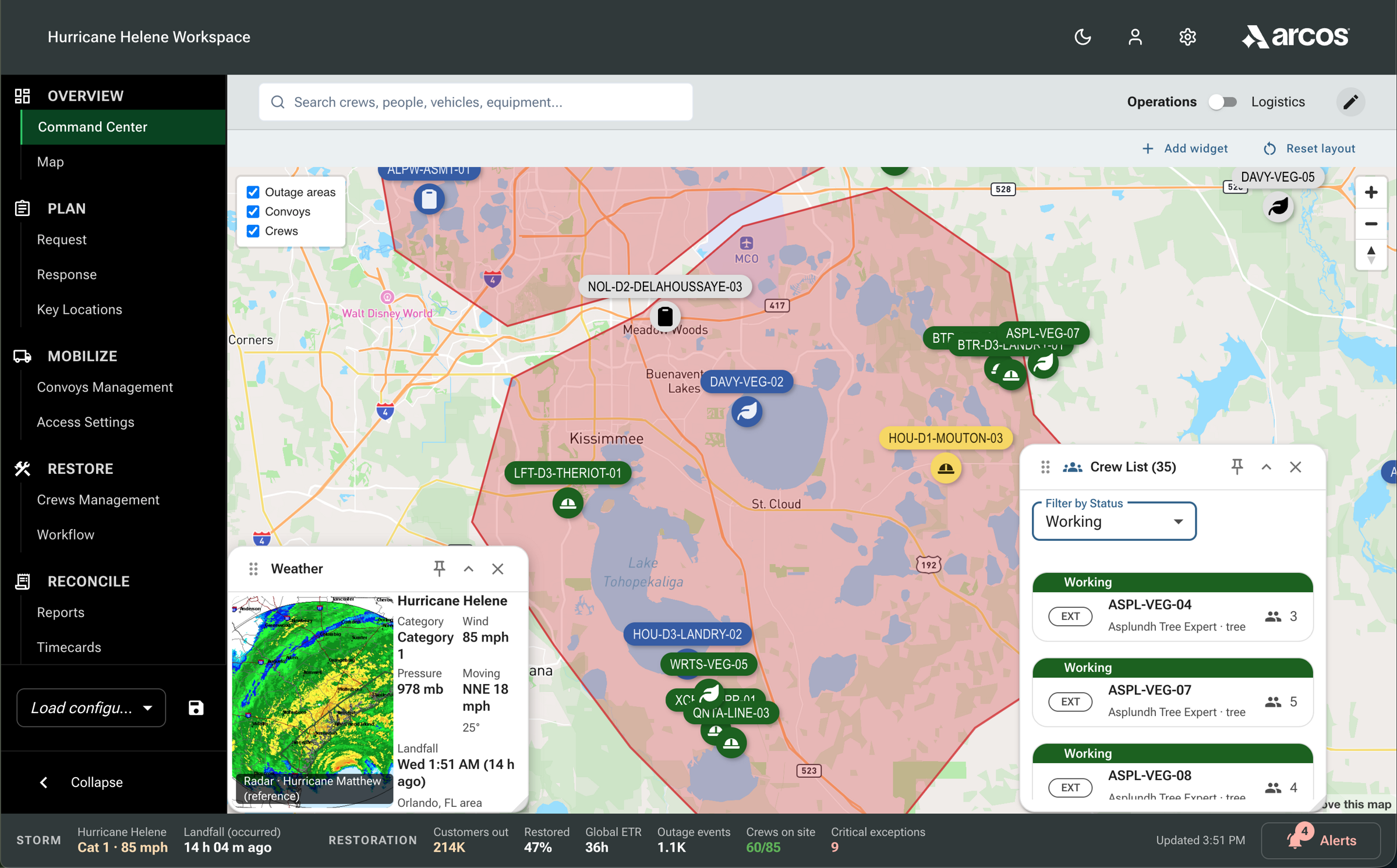
Mark 3, the near-final design, was built in three versions, one each by Oswaldo Vazquez, Ales Karoza, and me, and I led the design delivery. It puts a storm’s data on one screen: response progress first, every resource request in one table with a status chip, a layered map, convoy status, and a storm and restoration bar. This capture is my rebuild, since the final designs stayed with Arcos.
Reconstruction.How Mark 3 fits a storm’s worth of operational data on one screen. Rebuilt after I left Arcos from my last design files, with fictional data.Near-final · senior designers and me Sequence
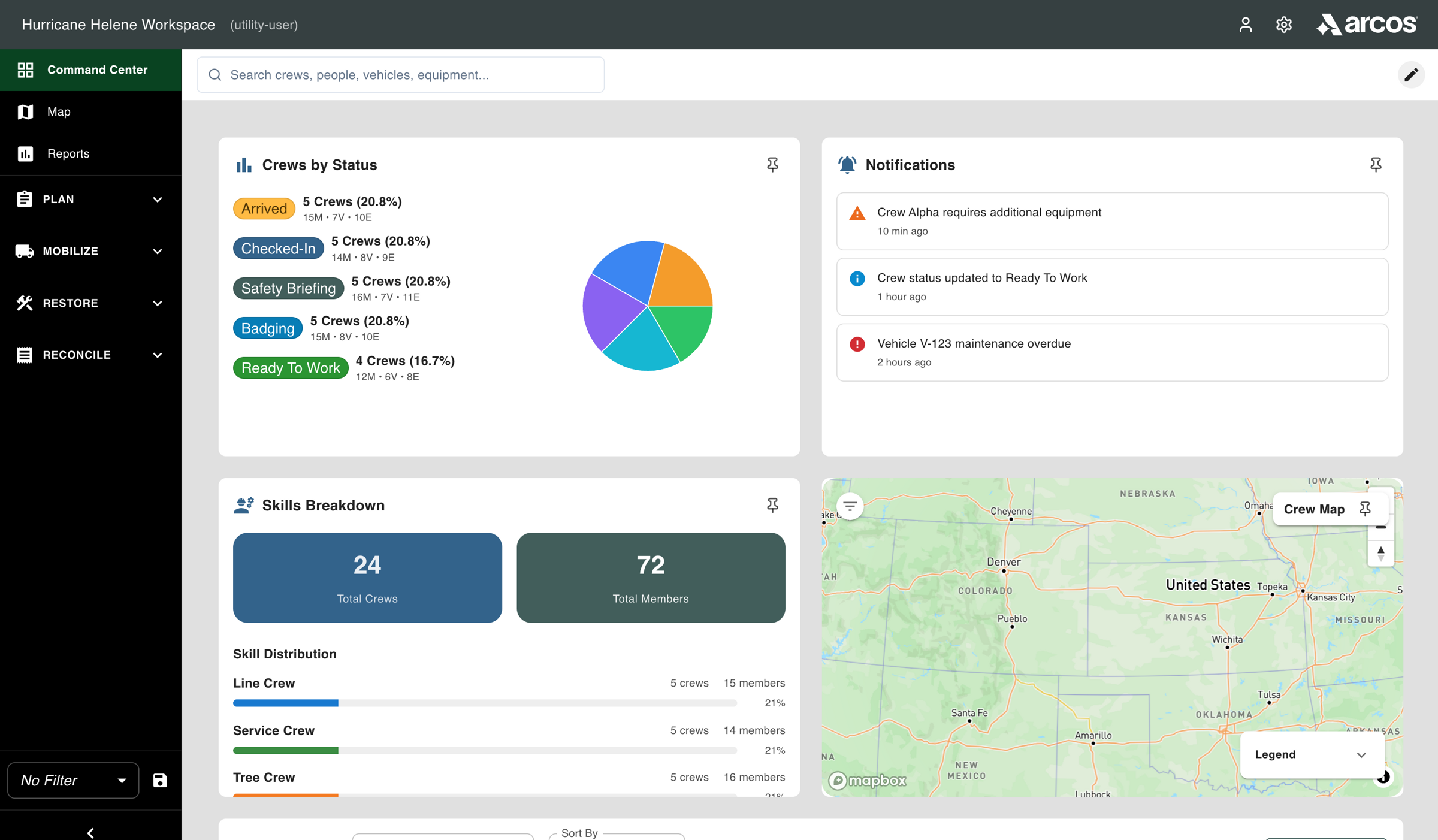
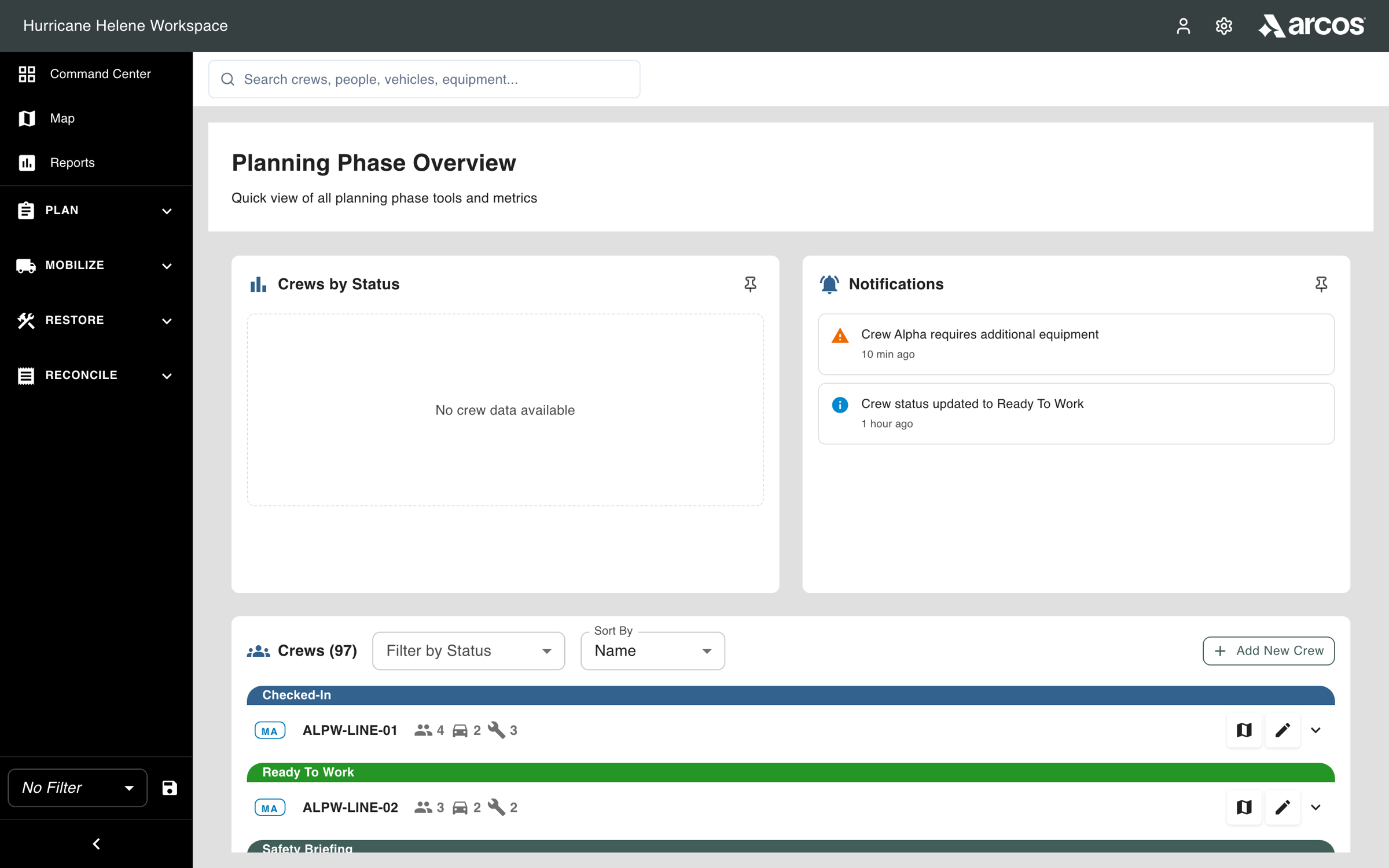
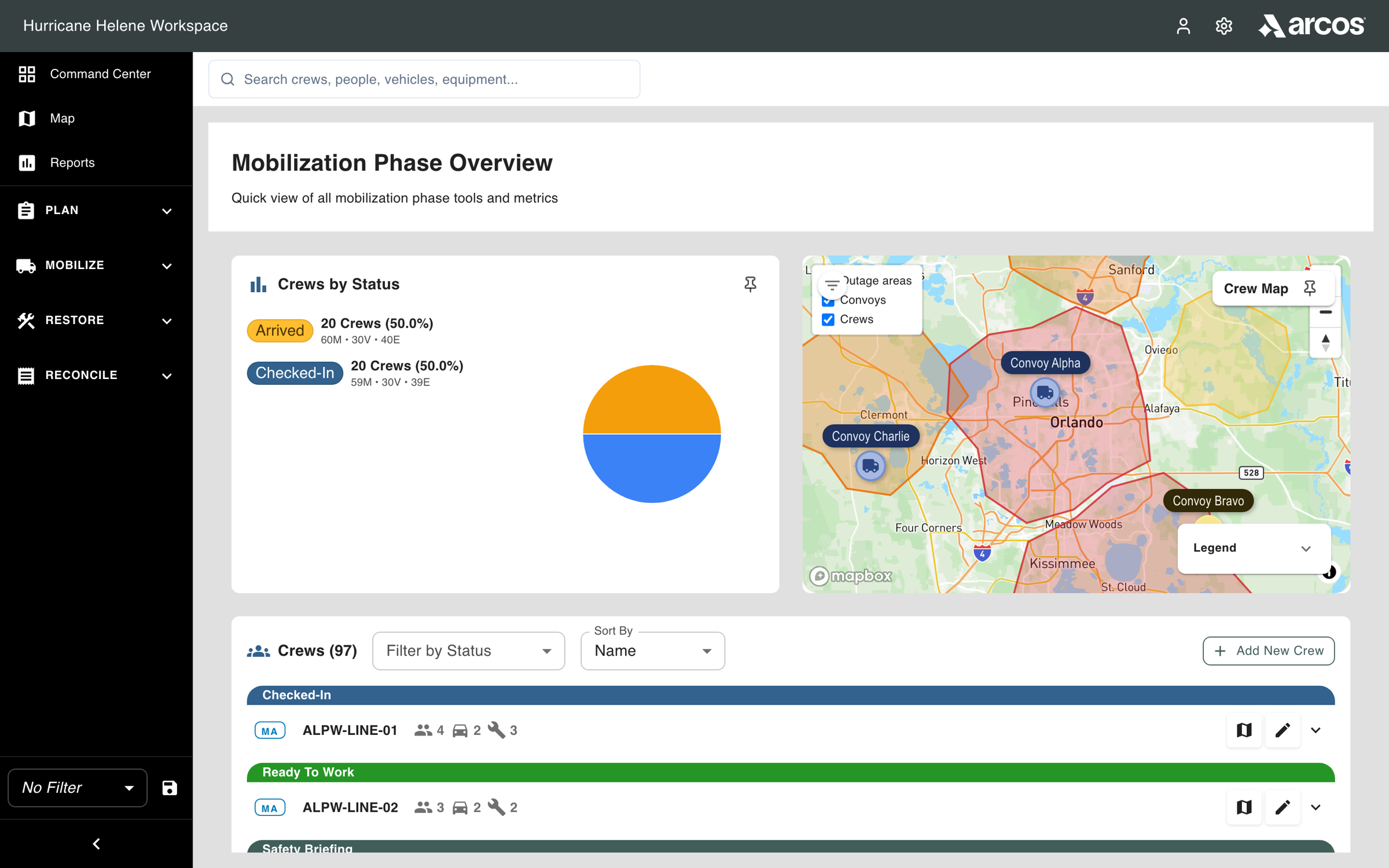
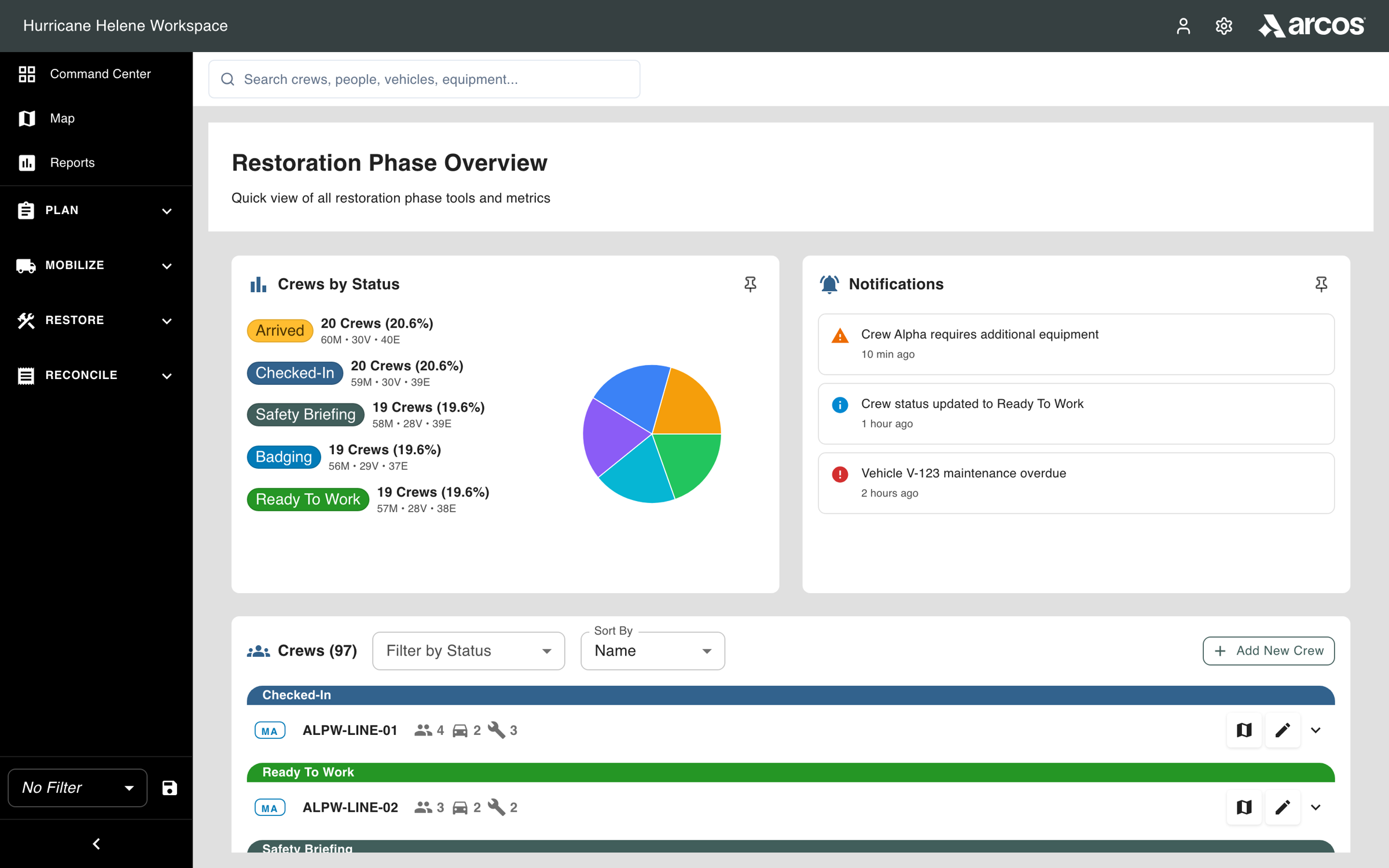
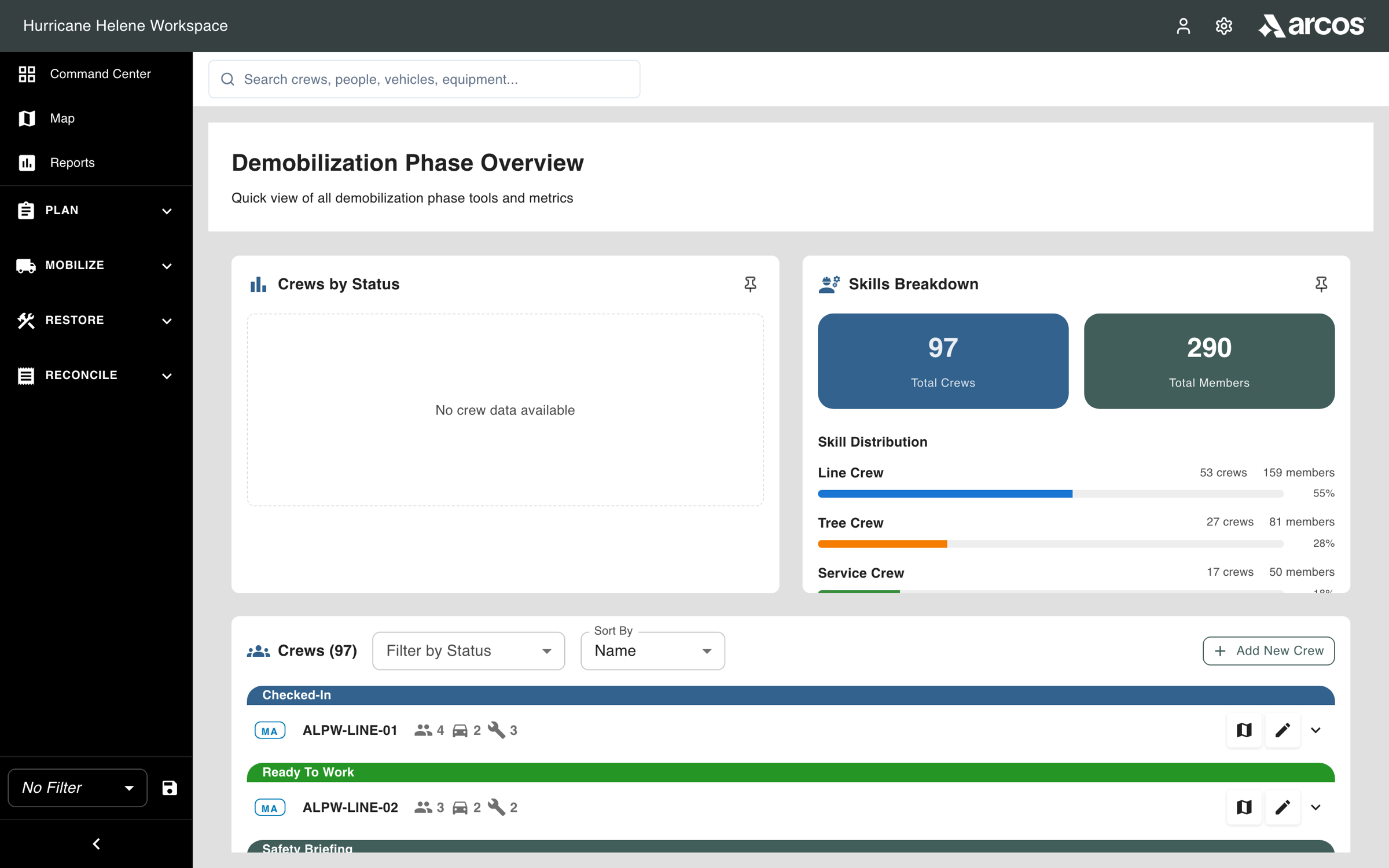
The navigation follows the storm phases from the blueprint: Plan, Mobilize, Restore, Reconcile. In Mark 1, each phase opens its own overview, with crews by status, a panel chosen for that phase, and the crew list. One Command Center carries the whole storm, and the phase decides what leads.
Plan Mobilize Restore Reconcile Mark 1 Command Center Planning Phase Overview Mobilization Phase Overview Restoration Phase Overview Demobilization Phase Overview Reconstruction.One Command Center, four phases. In Mark 1 each phase in the navigation opens its own overview: crews by status, a panel picked for that phase, then the crew list. Captured from a rebuild I made after leaving Arcos, from my original prototype and last design files. The data is fictional, and in it no crews carry a planning or reconcile status yet, so those two status panels are empty. Descope
Crew check-in at the staging site was the executive problem the redesign set out to solve, named by research before I joined. I prototyped it. Then executive and product leadership cut scope twice, and the first release shipped convoy tracking on schedule in August 2025, on the desktop, then called Storm App, and in Arcos Field together. Check-in was still manual and off-system when I left.
- Control Tower · Convoys
- Arcos Field · convoy (recreated interface)
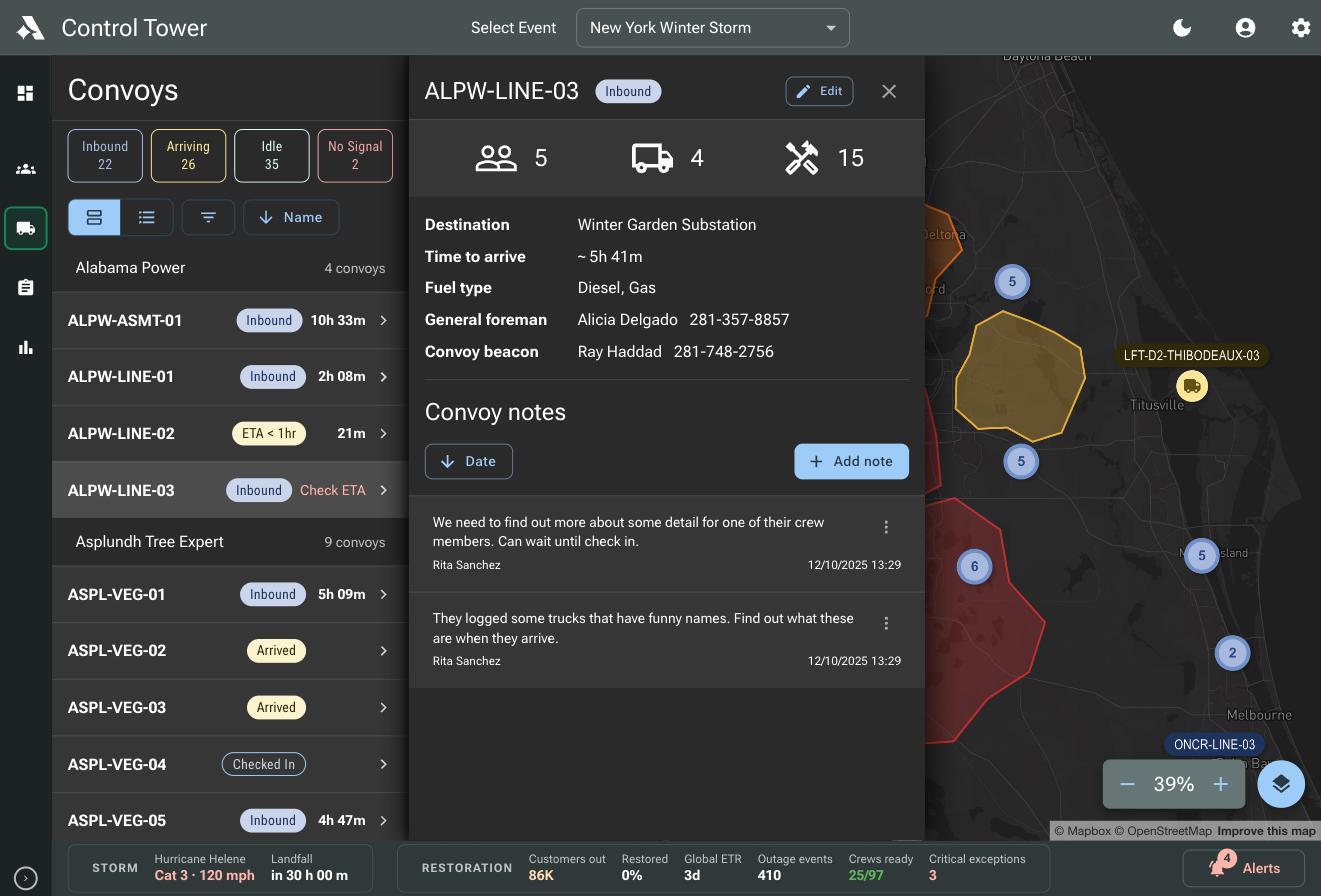
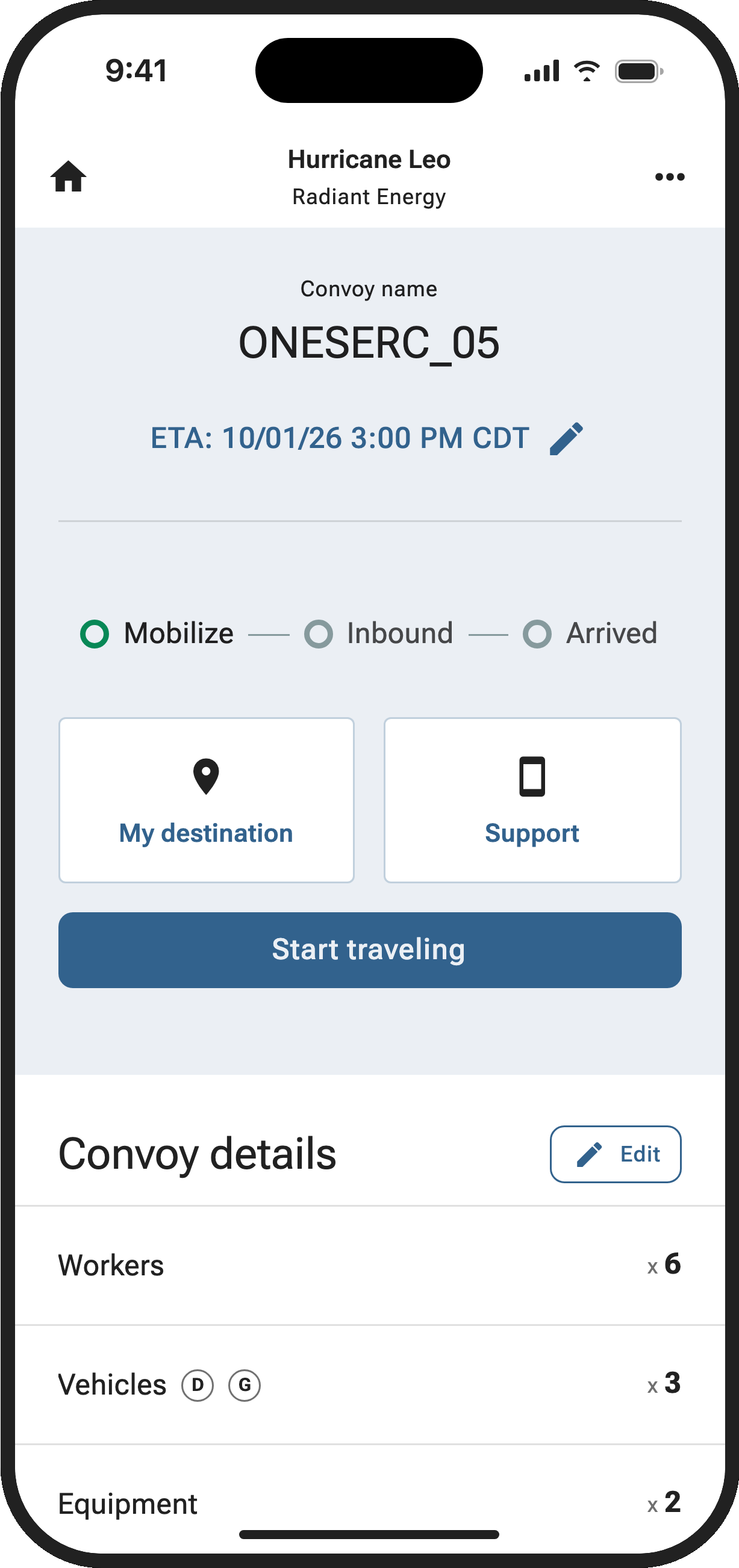
The two sides of convoy tracking. In the back office, convoys grouped by company with status and time to arrive, and the selected convoy’s destination, crew, and notes. On the phone, the crew’s convoy with its arrival estimate and Start traveling. The phone screen is a capture of the recreated interface. Ship
Convoy tracking was tested end to end with Storm Response Advisory Committee leaders and internal Customer Success users. Arcos Field launched with it in August 2025: login, account creation, event invites, convoy creation, and convoy tracking. Profile management followed in January 2026. After I left, Timecards, Timecards Management, and Rosters reached production in September 2026, and the Command Center went to beta.
- Pick or join an event
- Select a phase (recreated interface)
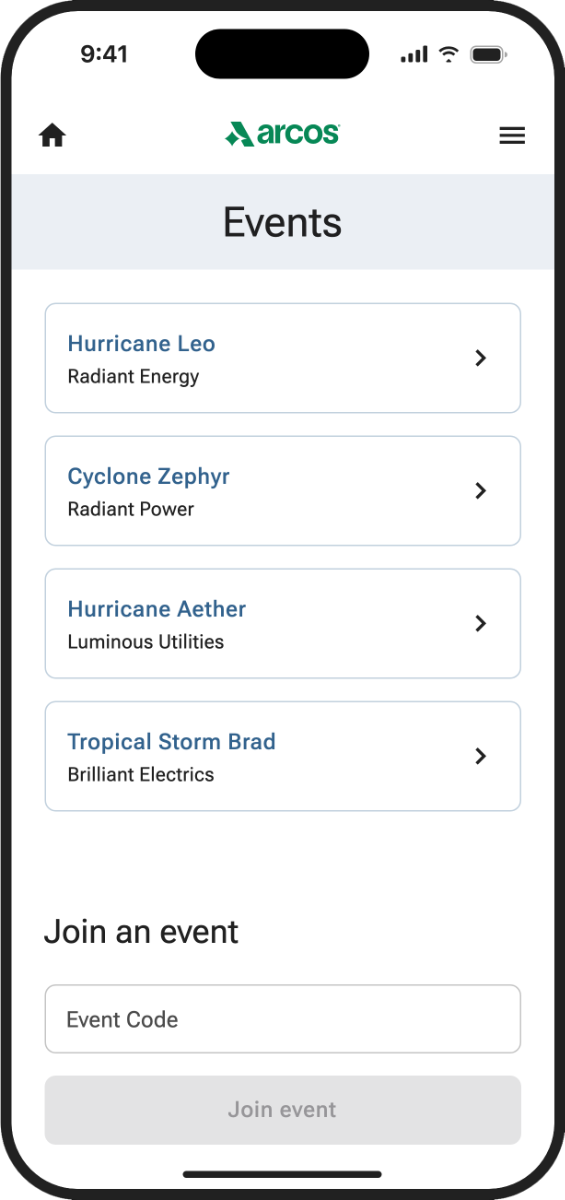
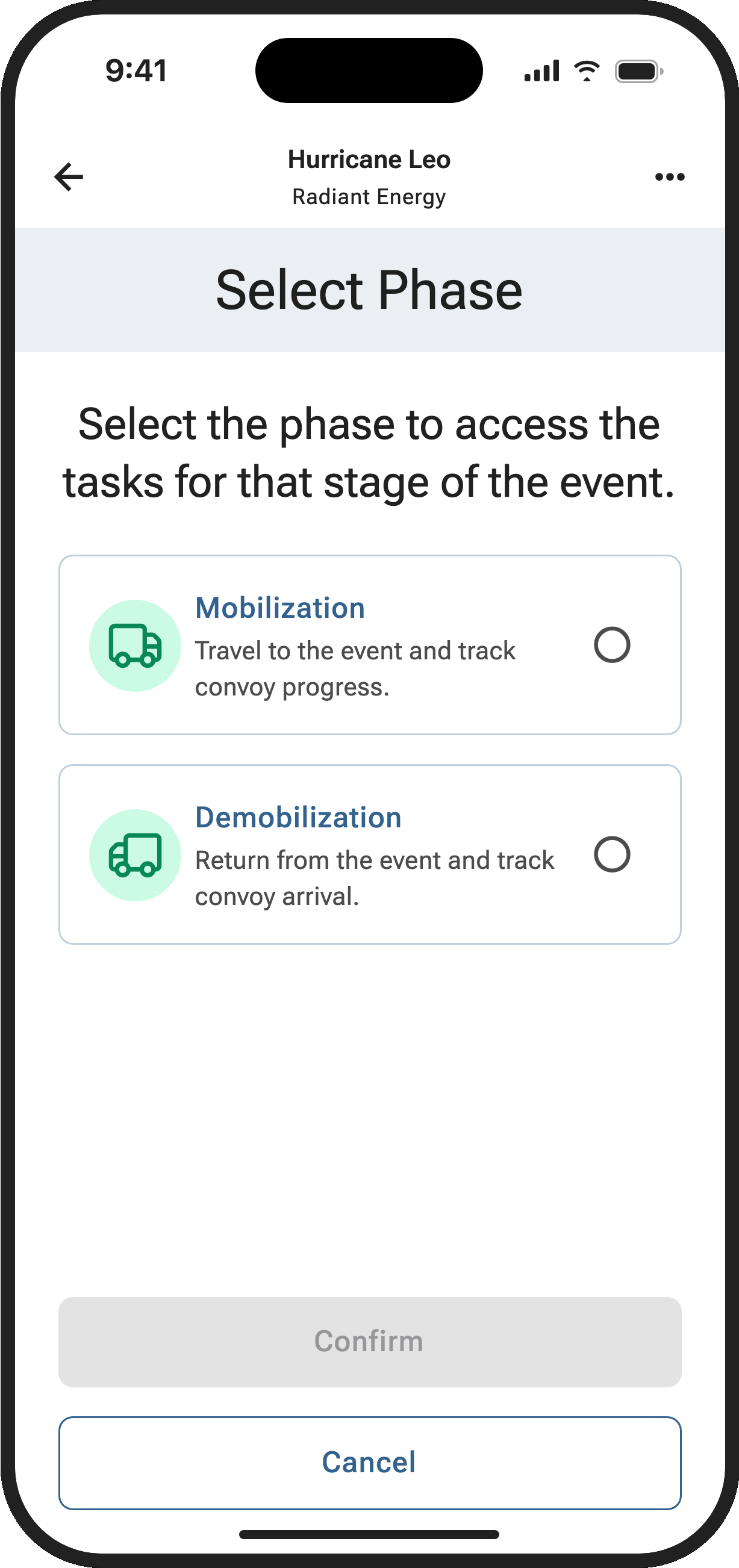
How a crew enters an event on the phone: pick or join the event, then choose a phase. The second screen is a capture of the recreated interface.
Decisions that mattered
Decision 1
Should Control Tower and Arcos Field modernize the legacy interfaces, or be rebuilt around the work?
- Options
- Choice
- Rebuild the platform around the sequence of storm restoration work
- Evidence
- The kickoff’s blueprint showed storm restoration as a sequence handed from role to role, while each tool did one job. A new look on separate tools would have kept the gaps between them. I recommended the change from my first four to five months of evidence, before the convoy tracking designs.
- What followed
- The platform became a workflow-native system that surfaces the right information and actions at each point in a storm response, with user lenses as its north star. The Command Center navigation follows the storm phases: Plan, Mobilize, Restore, Reconcile. The later fieldwork, where operators ran 4 monitors with 8 applications open, sharpened the personas and blueprints behind it.
Recreated.The storm restoration process as a service blueprint: four phases, and what each role does, hands off, and relies on in each. Redrawn for this page from the blueprint Erin Gold and I built from the kickoff. Decision 2
After executive and product leadership cut scope twice, what could the first release still do well?
- Options
- Choice
- Design convoy tracking as a complete job on both sides, with the full vision kept for later phases
- Evidence
- The cuts were leadership’s call, and check-in was out. Convoy tracking was a complete job on its own: the command center could see where inbound external crews were and prepare for their arrival. The plan behind it was to start moving customers off an older legacy solution without putting a full feature suite in front of them on day one.
- What followed
- Kept in August 2025: convoy tracking, destination management, and login on the desktop, and login, account creation, event invites, convoy creation, and convoy tracking in Arcos Field. Dropped: crew check-in, still manual and off-system when I left. Moving customers off the legacy solution was still lagging. User lenses stayed the plan for later phases.
Convoy status as each side sees it. The back office filters and badges convoys by status; the crew’s phone offers two phases and walks one convoy from Mobilize to Inbound to Arrived. I drew only the labels in the screens and left the order open where the screens don’t show one.
What I’d do differently
I spent most of my effort holding the vision through the cuts. Looking back, I would have pushed for one small piece of crew check-in inside the first release, since it was the problem the redesign set out to solve and it was still manual when I left. I’d also write down what each round of cuts traded away while it happened, so the reasoning outlived the meeting where it was decided.
Results
- Sites researched14AEP sites across six operating companies, August to October 2025, after the first release
- Participants120+Emergency managers and field workers observed and interviewed
- First releaseAugust 2025Desktop and Arcos Field together, on schedule, after two rounds of scope cuts
- On the phoneFive featuresArcos Field launched with login, account creation, event invites, convoy creation, and convoy tracking
- AI prototypingTeam-wide practicePMs and designers using Lovable on their own by August 2025
What shipped
Control Tower’s Convoys view: convoys grouped by company with status and time to arrive, and a detail panel for the selected convoy over the live map.
Arcos Field on a crew member’s phone: the list of active events, and a code field to join a new one.
Read the full story7 min
I joined Arcos in October 2024 with a plan already in motion: give the legacy emergency preparedness tools a modern UI and make the experience more consistent. That vision had been set before I arrived, with little research behind it, though early research had already named the problem the executives wanted solved: checking crews in at the staging site.
I was hired at the platform’s official kickoff. Over two days, fifteen people from Arcos and Slalom, the consultancy working with Arcos, defined the platform’s goals and personas from the data gathered so far. The harder question, what these users need to do their jobs during a major power outage, is where my work started.
A bag of screwdrivers
Erin Gold, a Slalom consultant on strategy, and I turned the kickoff’s sticky-note work into a service blueprint: four phases, from planning through demobilizing, and for each one what the command center and the field roles do, hand off, and rely on. Seen that way, the gaps between the tools were the problem.
The insight that reframed everything: users didn’t need a better bag of tools. They needed a system that understood the storm restoration process and gave them what they needed next, instead of making them hunt for the wrench in a bag of screwdrivers.
Every product was built as a separate tool, and storm restoration is a sequence handed from one role to the next. From the blueprint and the rest of what I learned in my first four to five months, before any convoy tracking designs, I recommended a different direction. Not a modernized UI. A workflow-native platform, one that follows the actual sequence of a storm response and surfaces the right information and actions at the right moment in that process.
Making the future tangible
My job then became turning that into a direction that product managers, engineering leads, and company leadership could see and believe in. Evidence alone doesn’t create alignment.
I developed the concept of user lenses, a framework for how the platform should adapt its experience to a person’s role in the storm process. A field crew supervisor in Arcos Field needed different information surfaces than a command center coordinator in Control Tower, even when both were working the same event. Lenses became the conceptual spine of the vision for both products.
It started as Mark 1, an early vision of the Command Center. To make it concrete, I built a working prototype in Lovable. Using AI-assisted prototyping as a leadership tool was a deliberate choice: get to something tangible fast, and use it to drive real conversation instead of abstract deck review. I worked in constant dialogue with the product managers and the design team, so the prototype reflected shared understanding, not only my reading of the evidence.
AI-assisted prototyping wasn’t about speed for its own sake. It was about compressing the distance between insight and stakeholder alignment, making the vision real enough to pressure-test.
The same rhythm held through delivery. On one planning milestone, working closely with Product Leadership, the research and design work delivered UX strategy up to 9 weeks ahead of planning sessions and set aside 2 to 4 weeks of structured discovery to check a feature’s value with utility users before development began.
Three marks of the Command Center
The Command Center is where the back office watches a storm. I created every Control Tower prototype, and the Command Center went through three marks. Mark 1 grouped tools by storm phase in its navigation. Mark 2, the testable prototype, put a full-screen restoration map behind floating panels, with a storm and restoration bar along the bottom, and leaders from the Storm Response Advisory Committee tested it. Mark 3, the near-final design, was built in three versions: one by Oswaldo Vazquez, one by Ales Karoza, and one by me. I led the design delivery.
- Mark 1 · early vision, created by me
- Mark 2 · prototype, created by me
- Mark 3 · near-final, senior designers and me
Mark 3 is built for density. Response progress leads the screen. Every resource request sits in one table with a status chip on each row. The map layers outage areas, convoys, and crews, and the storm and restoration bar keeps the numbers that matter in view whatever the panels above are showing. Financials and timecards get their own tab.
A note on what these captures are. The final designs stayed with Arcos when I left. The screens here come from a rebuild I made afterward, from my original prototype and the last design files I had, running on fictional data.
One screen, four phases
The blueprint’s phases show up directly in the product. Mark 1’s navigation names them Plan, Mobilize, Restore, and Reconcile, and each opens an overview of its own: crews by status, a panel chosen for that phase, then the crew list. During Mobilize the crew map takes the second panel; during Restore it’s notifications; during Reconcile, a skills breakdown of every crew on the event.
| Plan | Mobilize | Restore | Reconcile | |
|---|---|---|---|---|
| Mark 1 Command Center | Planning Phase Overview | Mobilization Phase Overview | Restoration Phase Overview | Demobilization Phase Overview |
Two cuts, one convoy
Crew check-in was the problem the redesign set out to solve. Before storm restoration can begin, external crews have to be checked in at a staging site, and that process was slow, error-prone, and still largely paper-based. I prototyped a check-in workflow.
Then executive and product leadership cut scope. Twice. The first release shipped on schedule in August 2025, about ten months after I joined, on both sides at once. The desktop app, then called Storm App, had convoy tracking, destination management, and login, so command center teams could see where inbound external resources were and prepare for their arrival. Arcos Field had login, account creation, event invites, convoy creation, and convoy tracking, so a crew could join its event and create its convoy on the phone. The product took the name Control Tower after that release. Leaders from the Storm Response Advisory Committee and internal Customer Success users tested convoy tracking end to end.
- Control Tower · Convoys
- Arcos Field · convoy (recreated interface)
Convoy tracking still had to make sense from both ends. The back office filters convoys by status and time to arrive; the crew’s phone walks one convoy from Mobilize to Inbound to Arrived.
The check-in process was still manual and off-system when I left. The first release didn’t ship the thing the redesign was meant to fix. That’s a real limitation, and I own it as part of the story.
Convoy tracking was meant as a low-disruption first step, the start of moving customers off an older legacy solution onto the new platform without overwhelming them with a full feature suite on day one. That movement was still lagging when I left. The vision hadn’t changed, though, and the user lenses concept was still the north star.
Watching storm mode happen
From August to October 2025, after that first release, I spent two and a half months on-site with American Electric Power, visiting 14 sites across six of their operating companies and spending time with both command center staff and field workers, roughly 8 to 10 people per site. The fieldwork was planned for Mobile Workbench, one of Arcos’s legacy products, and I folded in questions about time entry that became the Timecards work. I led the research, with Erin Gold and Steve Herring, both from Slalom, alongside me. None of it happened in a conference room. We sat with command center operators, went to staging sites, and watched what the workflow looks like under pressure.
Command center operators were running 4 monitors with 8 different applications open at once. Field workers kept a paper notebook, their “bible”, because it was more reliable than any digital tool when pressure was high and connectivity was spotty. The fieldwork didn’t start the reframe, but it sharpened it: what we saw went into the Control Tower and Arcos Field personas and the Control Tower service blueprints.
What shipped, and when
In production, August 2025: convoy tracking, destination management, and login on the desktop, and login, account creation, event invites, convoy creation, and convoy tracking in Arcos Field, all designed by me and launched together. January 2026: user profile management on both phone and desktop, which Apple’s App Store required. After I left, Arcos Field Timecards, Control Tower Timecards Management, and Control Tower Rosters reached production in September 2026, and the Command Center was released to beta.
- Pick or join an event
- Select a phase (recreated interface)
Holding the longer arc
The most important thing I did on Control Tower and Arcos Field wasn’t the research, the prototype, or the design work, though all of those mattered. It was keeping a clear and credible picture of where the platform needed to go, even when organizational constraints meant it couldn’t get there all at once.
The AI-assisted prototyping piloted during this project also outlasted it. By August 2025, product managers and designers were using Lovable on their own to turn product needs into tangible examples for leadership review, faster than before. That capability didn’t exist at Arcos when I arrived. Building it was part of the job.
Team
- Erin Gold, strategy (Slalom consultant)
- Steve Herring, design production and operations (Slalom consultant)
- Oswaldo Vazquez and Ales Karoza, senior designers (Mark 3)
Agent view
This page has a machine-readable twin, generated from the same source rather than written alongside it.
See how an agent reads this page