
Format: Research · Product craft
The Notebook in the Truck
A lineman kept a paper notebook in his truck to check his time entry against, because payroll had gotten it wrong before. Getting him to trust the app meant tracing his notebook back to what was actually broken: not the screen, the data model underneath it.
Utility field crews took 2 to 4 minutes to log one time entry against a 45 to 60 second target, so entry got put off until it was remembered instead of recorded, and a lineman kept a paper notebook because payroll had gotten it wrong before.
- My part
- Head of UX. I traced the defect to the data model, wrote the Milestone outcome, built a coded prototype for early user testing, and ran the instrumented test during a Duke Energy storm simulation. I was the only designer on the AI Expense Agent.
- The team’s part
- Ales Karoza owned mobile time entry and finalized the Timecards Mobile screens; Oswaldo Vazquez owned the back office, and I finalized the initial Timecards Management screen. Arcos’s CPO proposed validating at the Linemen’s Rodeo, and executives held Shaping for it.
- Status
- Shipped
- Timeline
- Aug 2025 – Jul 2026
Outcome
Timecards Mobile and Timecards Management shipped in beta in June 2026 and reached production in September 2026, after I left.
The short version
Observe
At an American Electric Power site, researching a different product, I watched a lineman log his time. He kept a paper notebook in the truck to check the app against, because payroll had gotten it wrong before. One entry meant finding the job by number, picking a work type from a tree that sets the pay rate, then finding the work order. Target: 45 to 60 seconds. Observed: 2 to 4 minutes, about 2.5 most often.
What one time entry took in the old timecard: find the job by number, pick a work type, then go find the work order. Redrawn from my original interview slide. Trace
The screen wasn’t the defect. Customers had already bought Crew Manager, which models crews, equipment, and vehicles, but the legacy timecard read only the logged-in user’s own record, so a foreman retyped his crew every entry. Two enterprise renewals were in trouble, timekeeping among the named reasons. The working hypothesis was individual-only entry; crew integration was wanted but believed unavailable, so Milestone deferred it.
The change was in the data model, not the screen. The old timecard read only the logged-in user’s own record, so a foreman retyped his crew by hand. After the Rodeo, entry moved to the crew: it shows up already filled in, and hours go in for everyone at once or one person at a time. Test
One foreman entering time for his crew isn’t a sample, so I took it to leadership as a concern. Arcos’s CPO asked whether the Linemen’s Rodeo, six weeks out, could do double duty, and executives held Shaping about two weeks for it. Roughly 400 linemen and foremen confirmed that team leads enter for the crew, and that every entry needs a work order, storm included. Both were data-model corrections, caught as a prototype revision instead of a schema change.
Prototype
Timecards, early Mark 2: crew entry
Interactive demos are best used in a desktop environment. Please return on a desktop or laptop to try this demo. Screenshots and the case study are available on this device.
An early Mark 2 prototype, rebuilt around crew-level entry after the Linemen’s Rodeo. Demo mode: data is fake and changes aren’t saved.
- Mark 1: one person (Rodeo build)
- Mark 2.1: the whole crew
The artifact the Rodeo produced: Mark 1 as built for one person, and the start of Mark 2 once roughly 400 linemen and foremen showed that team leads enter for the crew. The first screen is the Rodeo build; the second is Mark 2.1, the crew-entry build I made at Arcos after the Rodeo. Prototype screens with fictional names. Measure
Mark 2 began as my 12-hour crew-entry build, Mark 2.1; Ales Karoza refined it as Mark 2.2. In December I tagged Mark 2 with Pendo and ran an unmoderated test during a Duke Energy storm simulation, measured against baseline on time to goal, click-backs, and error corrections. The flow worked. Two findings went to v2 instead of blocking v1: a user wanted the work order attached automatically, and one crew calls a bucket truck a cherry-picker.
Prototype
Timecards, coded concept (mark 2)
Interactive demos are best used in a desktop environment. Please return on a desktop or laptop to try this demo. Screenshots and the case study are available on this device.
Mark 2, which I rebuilt on Harmony after I left Arcos because the original stayed with Arcos: the same crew-level entry flow at higher fidelity, not the 12-hour Mark 2.1 build itself. Not the shipped product. Demo mode: data is fake and changes aren’t saved.
- Schedule Verification
- Exception Requests
- Edit: Group Time Entry
- Edit individual times
- Timecard Submitted
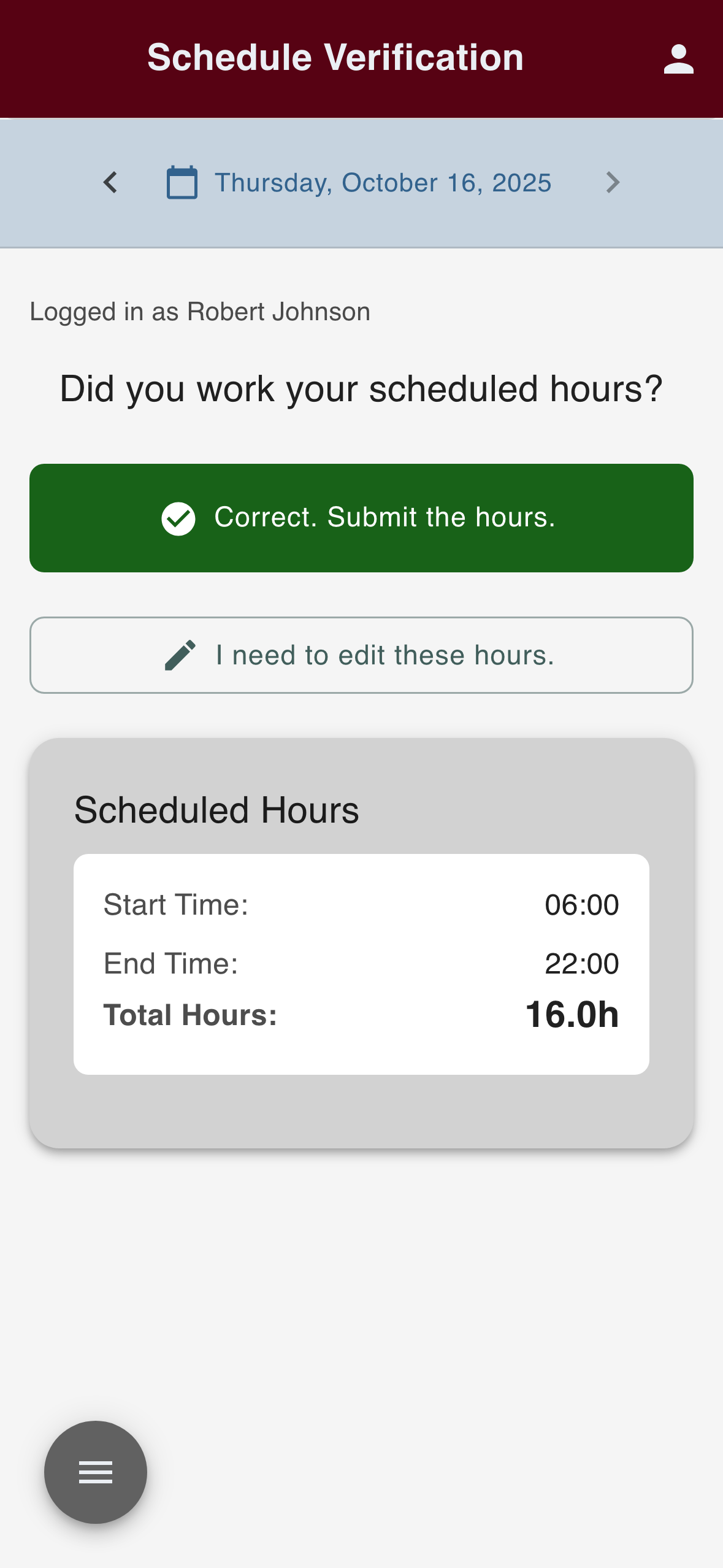
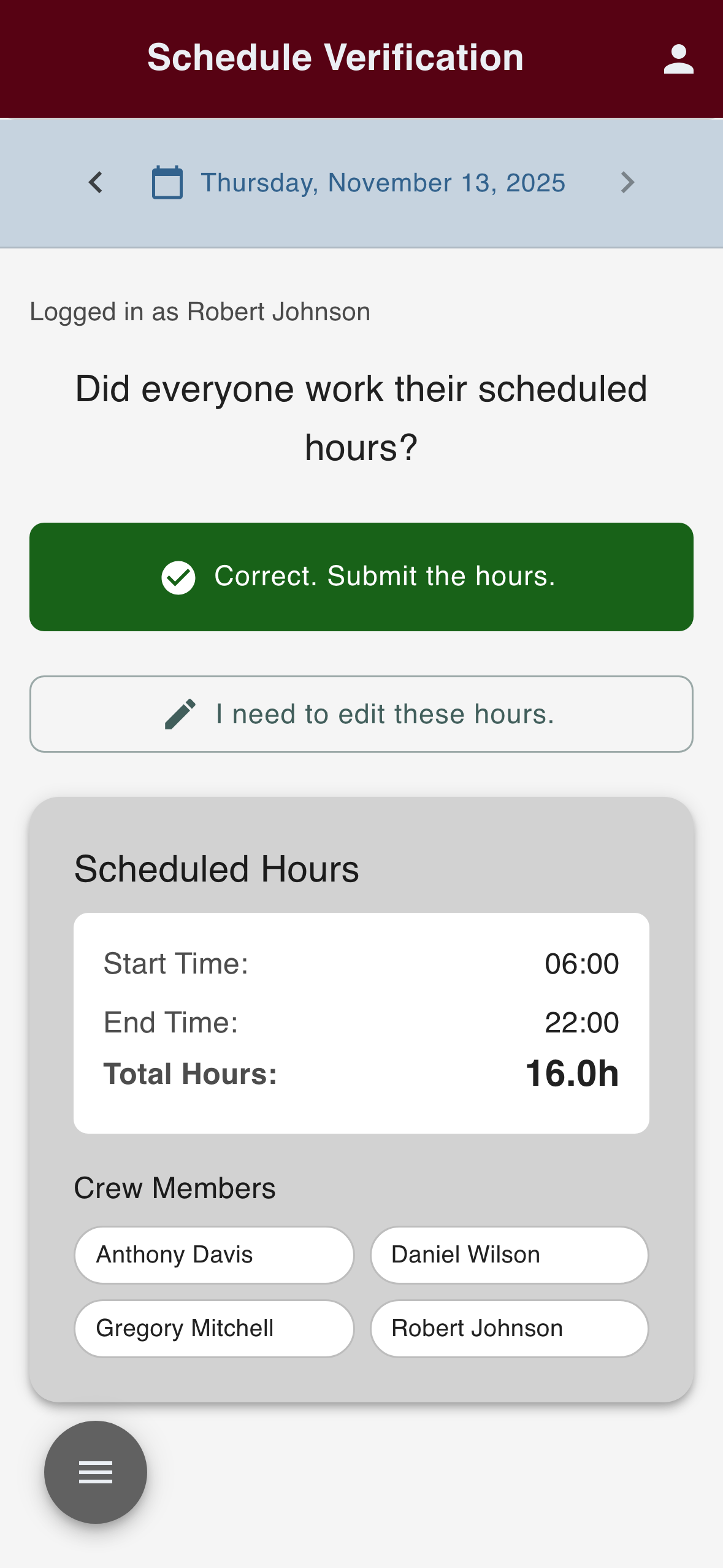
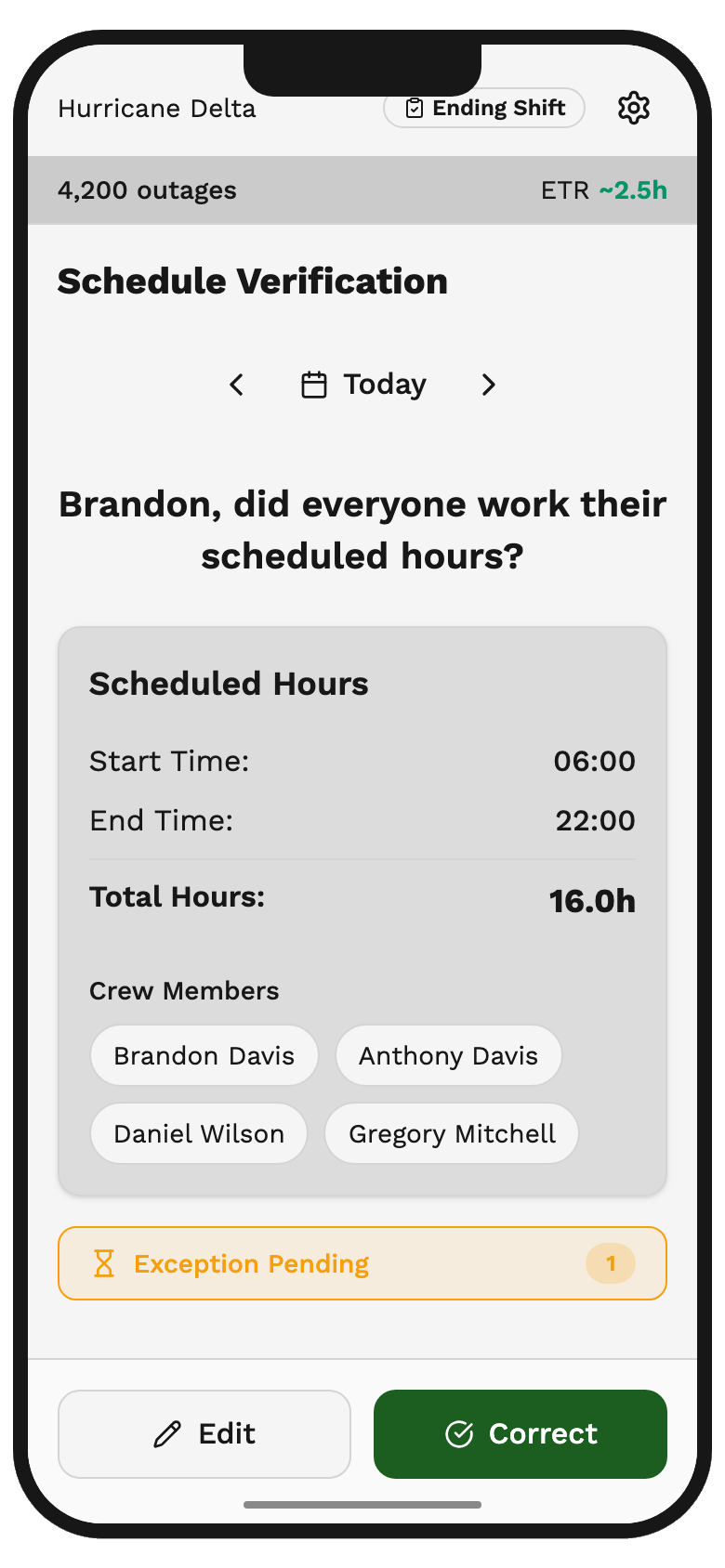
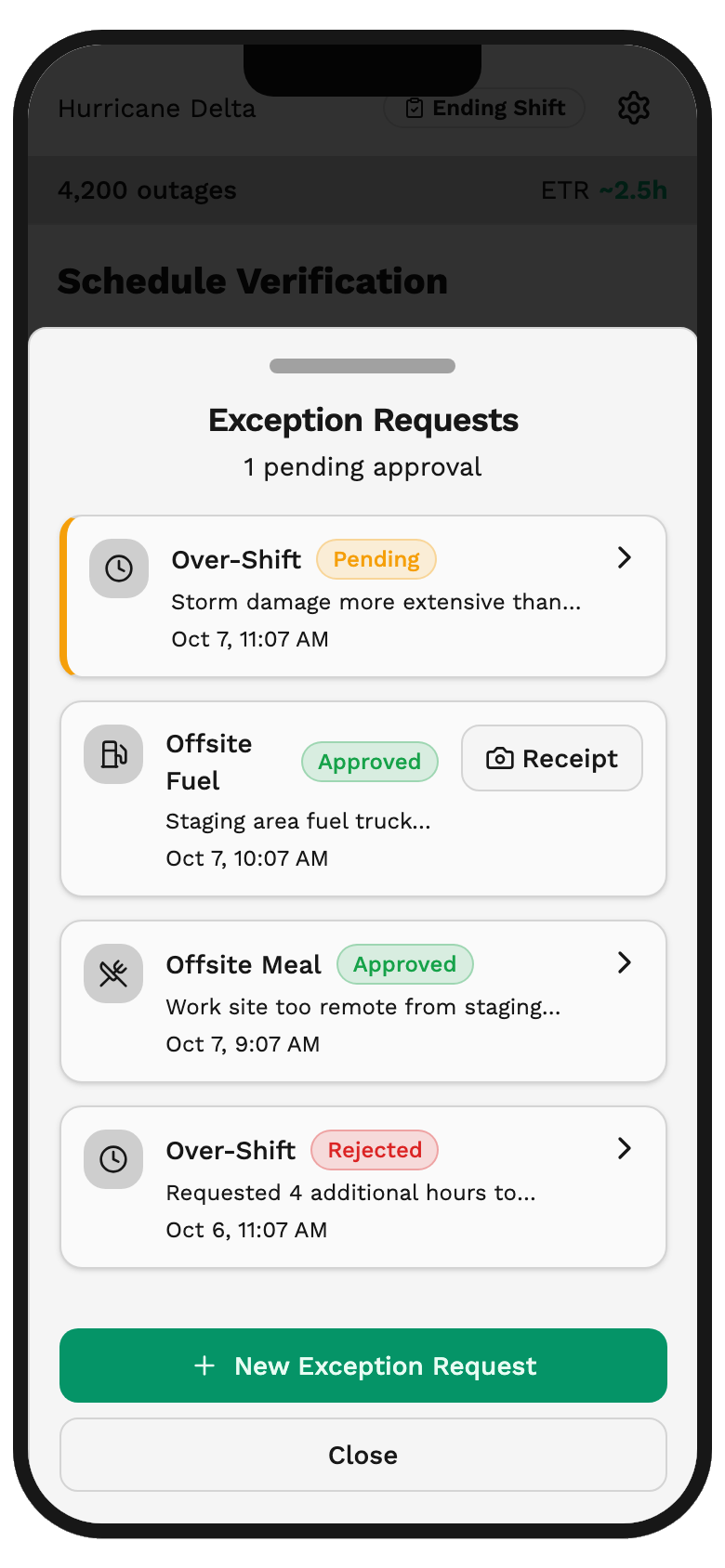
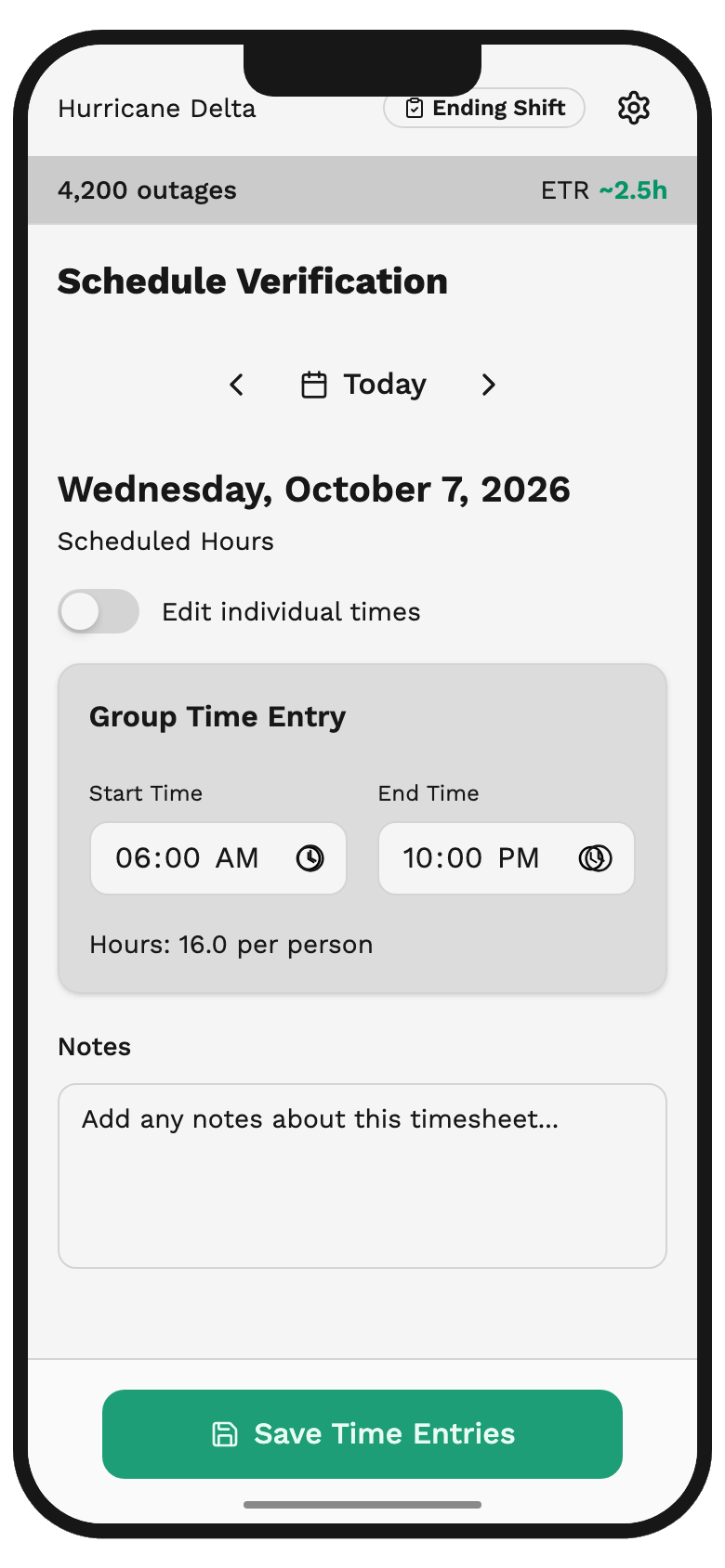
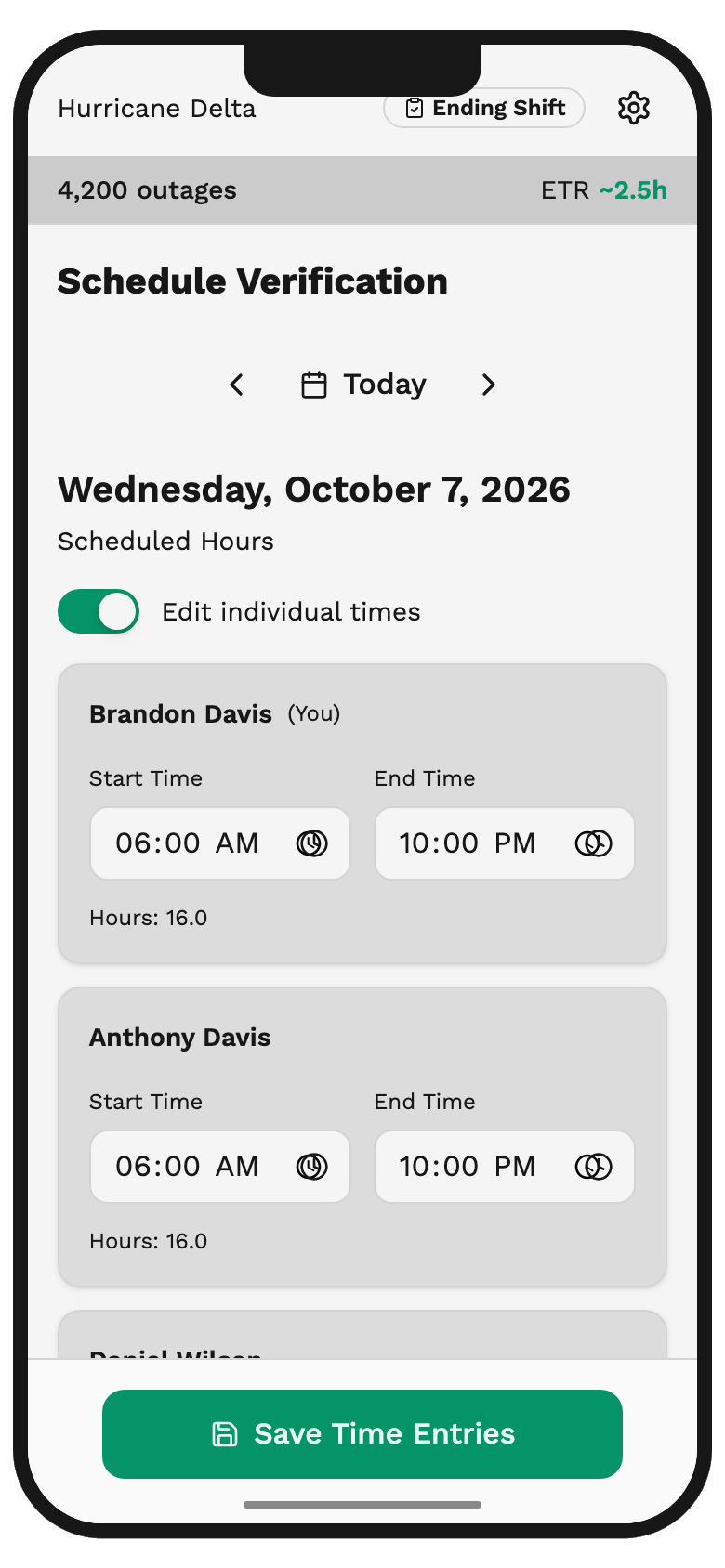
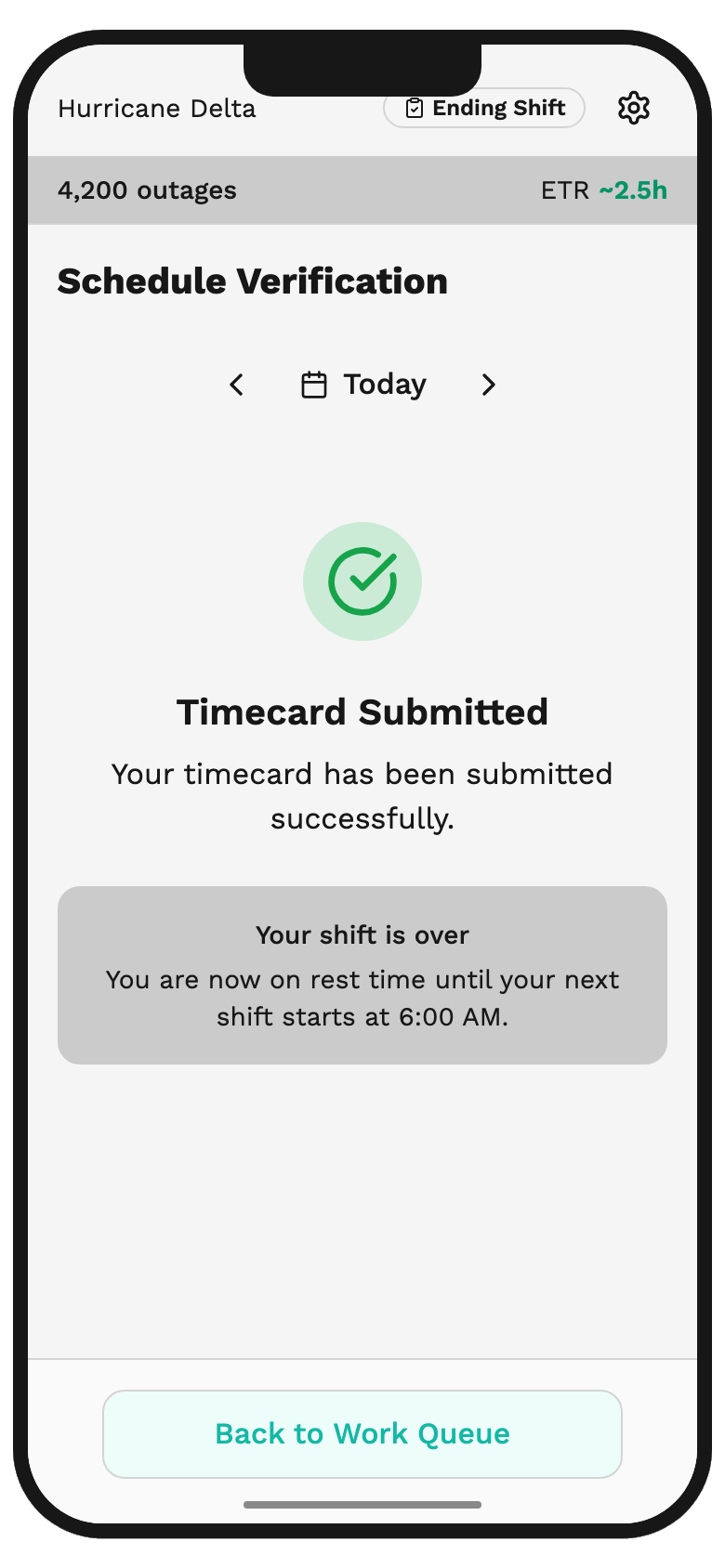
Reconstruction.States from the mark-2 demo, which I rebuilt on Harmony after I left Arcos, captured with its fictional data and its own labels: a crew lead’s verification with one exception pending, exception requests that are Pending, Approved, or Rejected, editing time for the group or switching to individual times, and the submitted timecard. Ship
Timecards Mobile and Timecards Management shipped in beta in June 2026, then reached production in September, after I left. The crew shows up already filled in, and hours go in for everyone at once or one at a time. In alpha, with internal experts, one entry took 60 seconds, and because edits are bulk, that covered a whole crew. One at-risk renewal closed on the planned capability as presented, before anything shipped. The second was still open when I left.
- One segment, whole crew
- Add a time segment
- Submitted for review
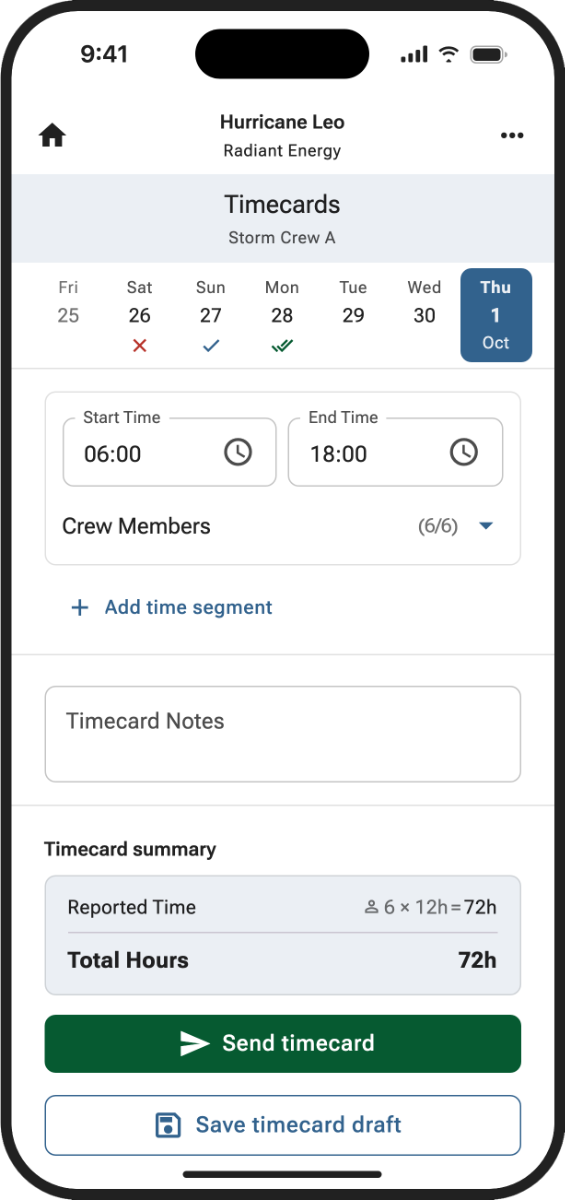
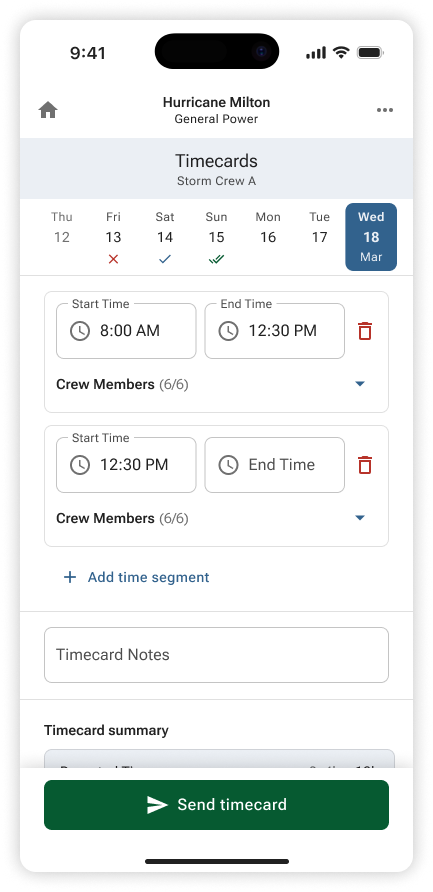
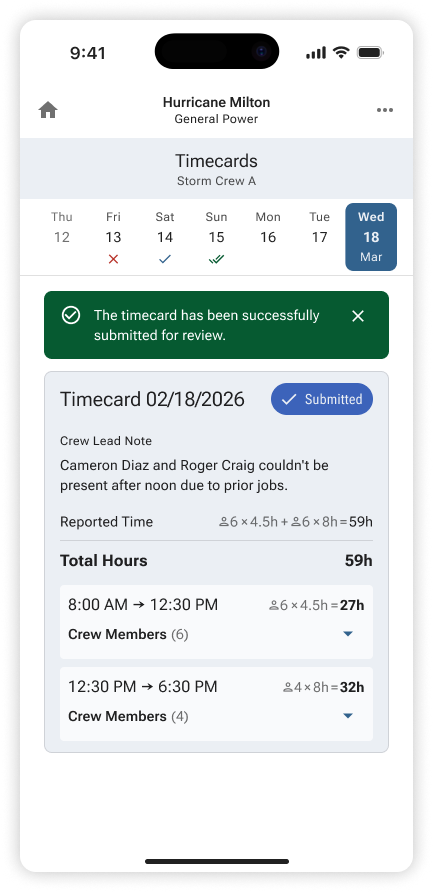
Timecards Mobile as it shipped in beta, with final screens by Ales Karoza: one time segment covers the whole crew, another can be added, and the submitted timecard calculates hours per person.Final · senior designer Extend
I was the only designer on the AI Expense Agent. Its confirmation splits the agent’s work into checkable claims: the expense filed to today’s report and awaiting review, the exception it validated, the meal break added to the timecard as a draft. Internal users and five utility managers from the advisory committee tested it, but I have no usage data on trust. It reached production in September 2026, after I left, as an opt-in feature.
Prototype
Expense Agent, rebuilt after Arcos (mark 3)
Interactive demos are best used in a desktop environment. Please return on a desktop or laptop to try this demo. Screenshots and the case study are available on this device.
I rebuilt the AI Companion’s receipt workflow from my last notes and design files after I left Arcos. This is a prototype of the interaction, with scripted responses and fictional data. It does not call a live AI model or save submissions.
Recreated.The AI Expense Agent’s confirmation after a crew member sent a receipt. Each piece of the agent’s work shows as its own status, and nothing it touched is final until a person acts. Tested with internal users and five utility managers from the Storm Response Advisory Committee; there is no usage data on how people trusted it.Final · designed by me Admit
What I don’t have is a field number proving the crew-level fix held. Product owned Pendo and the beta’s numbers, and that tracking never firmed up once crews worked long stretches with no connection. I hadn’t agreed on the after-number before build, or planned a manual check. Whether the lineman still keeps his notebook, I don’t know.
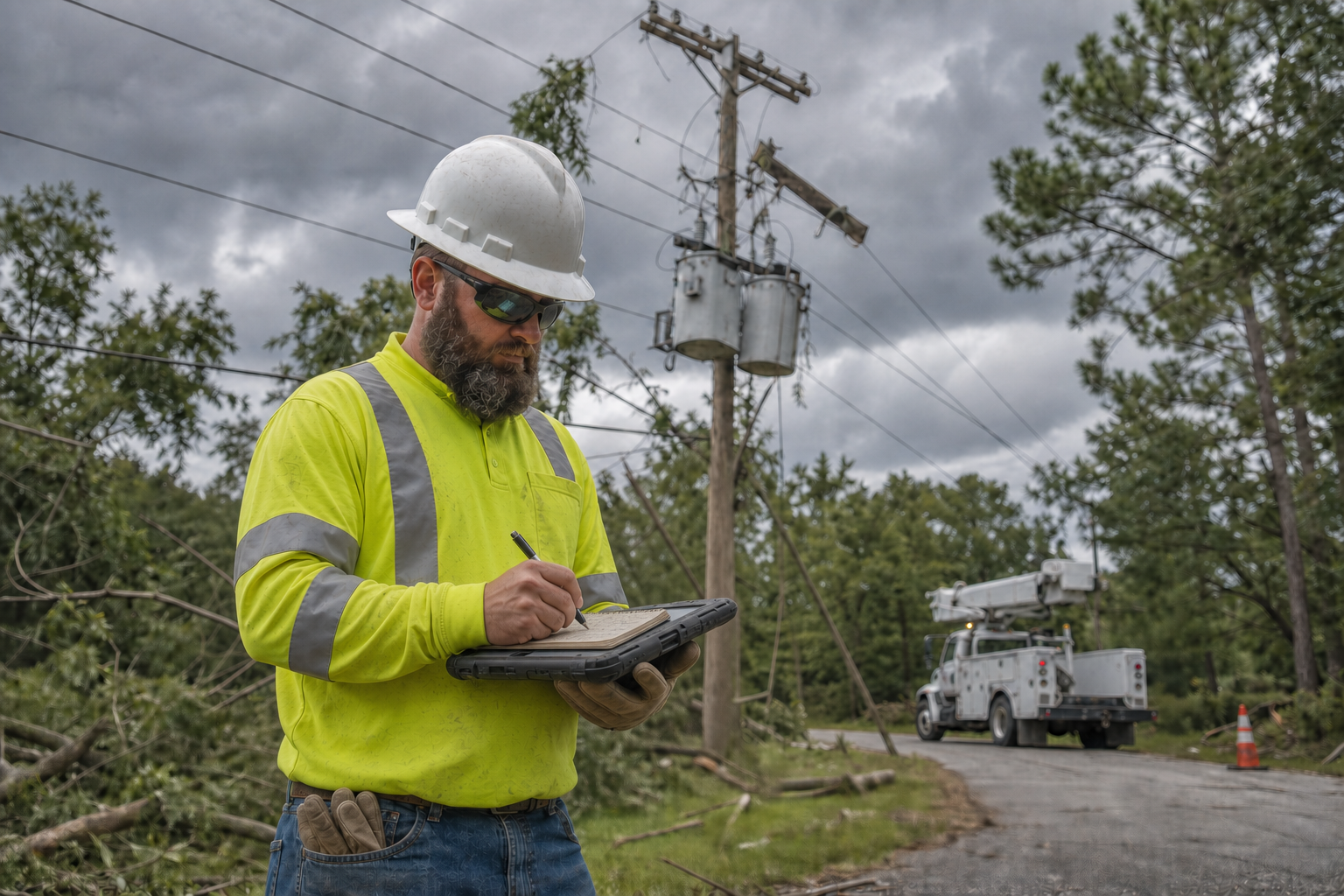
Illustration.The notebook in the truck: paper kept ahead of the app, because payroll had gotten it wrong before.
Decisions that mattered
Decision 1
Should time entry be modeled per person or per crew?
- Options
- Choice
- Entry per crew, with a switch to one person at a time
- Evidence
- Product’s Gainsight and Pendo reports fit the per-person scope, but in August I watched a foreman enter time for his whole crew, and roughly 400 linemen and foremen at the Linemen’s Rodeo confirmed that team leads enter for the crew. Individual entry was never wrong, only incomplete for storm response.
- What followed
- The crew shows up already filled in and hours go in for everyone at once. In alpha, one 60-second entry covered a whole crew.
The change was in the data model, not the screen. The old timecard read only the logged-in user’s own record, so a foreman retyped his crew by hand. After the Rodeo, entry moved to the crew: it shows up already filled in, and hours go in for everyone at once or one person at a time. Decision 2
Validate at the Rodeo first, or start building on the Milestone scope?
- Options
- Choice
- Hold Shaping about two weeks and test at the Linemen’s Rodeo
- Evidence
- One site isn’t a sample, so the foreman observation went to leadership as a concern, not a finding. Executives signed off on validating at scale before any development resource committed.
- What followed
- Two data-model corrections, crew entry and a required work order, landed as a prototype revision for one plane ticket and about two weeks, not as a schema change in build.
- Mark 1: one person (Rodeo build)
- Mark 2.1: the whole crew
The artifact the Rodeo produced: Mark 1 as built for one person, and the start of Mark 2 once roughly 400 linemen and foremen showed that team leads enter for the crew. The first screen is the Rodeo build; the second is Mark 2.1, the crew-entry build I made at Arcos after the Rodeo. Prototype screens with fictional names. Decision 3
Should the December findings hold v1?
- Options
- Choice
- Ship v1 with a notes field for the work order, and take both findings into v2 planning
- Evidence
- Measured against baseline, the instrumented test showed the crew-entry flow worked. The two negative findings were about attaching the work order and naming equipment.
- What followed
- Timecards shipped in June 2026, in beta, with a notes field that wasn’t the real answer for the work order but was the honest one for a first release.
What I’d do differently
I’d agree on the after-number before build starts, and plan a manual check wherever Product’s tracking might not reach the field, so a fix isn’t called done without a before and an after. I’d also put an engineering lead in the room at the end of Milestone. The Crew Manager no-go was scoped around data believed to be unreachable, and a more granular Crew API was already on its way from the legacy side.
Results
- The gap45–60 sec target vs. 2–4 min observedTarget set from industry norms and direct field observation before the work started; 2.5 minutes was the typical figure on a standard job
- Caught before build2 corrections to the data modelEntry-per-person to entry-per-crew, and an optional work order to a required one, both surfaced at the Linemen’s Rodeo before a line of production code was written
- Validated twice, independently~400 at the Rodeo, then a storm simulationThe Linemen’s Rodeo in October, then an instrumented test with a smaller group during a Duke Energy storm simulation in December, at a different utility
- ShippedJune 2026, in betaAs Timecards Mobile and Timecards Management, reaching production in September 2026, after I left; one of two at-risk enterprise renewals closed on the presented capability before anything shipped
- Alpha result60 seconds per entryInternal experts. Bulk crew editing meant one entry covered a shift’s worth of a crew, beating the roughly-triple target set for a crew lead, not just meeting it
What shipped
Timecards Mobile: one time segment covers the whole crew, and another can be added before the timecard is sent.
Submitted: hours calculated per person across both segments, with the crew lead’s note on two partial days.
Read the full story8 min
The notebook in the truck
I was at an American Electric Power site doing field research for a different product entirely. Timekeeping wasn’t on my list, but I had the access, so I asked about it and watched a lineman do it.
He kept a notebook in the truck to check it against. Not instead of the app. Ahead of it. Job by job, he’d jot the hours, the job code, the work type on paper. The real entry happened later, on a laptop back at the office. He kept the paper anyway, because payroll had gotten it wrong before: hours missing, hours billed to the wrong rate.
That single detail turned out to hold the whole project.
What one entry took
You find the job, by job number. Then you pick the work type, and that’s not one choice, it’s a tree: travel, assess, repair, then which kind of repair, or wait time. That tree exists because it sets the hourly rate. Then you find the work order number and attach it. None of it was filled in ahead of time, and none of it was filtered down to the person already logged in.
The target was forty-five to sixty seconds and three to five taps, set from industry norms and from what I’d already watched people do before the work started. What I observed was two to four minutes, with two and a half minutes the number that kept coming up on a standard job. For a crew lead entering on behalf of three people, the target was roughly triple, because the work really is three times the size.
The system knew his role, his crew, and that there was a storm, and used none of it. A job runs two to four entries, and a shift runs eight to fifteen jobs, so a typical day meant somewhere around sixty to ninety minutes just putting time in. On a storm day, at the heavy end of both ranges, it’s closer to four hours, inside a shift that’s already ten to twelve. Slow entry gets put off, and by the end of a long shift, put off means remembered instead of recorded. That’s a payroll problem waiting to happen, and it’s why the notebook existed.
What was at stake
Two enterprise renewals were in trouble, and timekeeping was one of the named reasons. That came to me through a standing forum I ran with Sales Engineering, where Tino Mathew, VP of Field Engineering, brought concerns straight from the field back to product.
Most of those customers had already bought Crew Manager, which models the entire operation: individuals, crews, equipment, vehicles, lodging. The legacy timecard never touched any of it. It read the logged-in user’s own record and nothing else, so a foreman retyped his crew by hand, every entry, out of a system his company had already paid for.
Arcos had built time entry once already, before there was a UX function. It shipped, and it missed, so the question I pushed into intake was why the last one missed and what had to be different.
Writing the outcome
Arcos ran an adapted Shape Up, with a phase ahead of Shaping called Milestone, which turns a raw business ask into capabilities, not features. What came into intake read like a list of tasks, and none of them said what would become true for anyone.
I wrote it in three parts instead. The outcome: a crew lead can submit time for their crew for the day, from the truck. The signal: the forty-five to sixty second, three to five tap benchmark. The no-gos: a month view, and Crew Manager integration. The integration was wanted, and deferred rather than dropped, on the belief that the crew record would have to be rebuilt inside the new platform and synced back later. That belief turned out to be wrong.
Two designers, two domains
Ales Karoza owned mobile time entry. Oswaldo Vazquez owned the back office. Those were domains, not assignments: opposite ends of the same data model. Each was the authority on their end instead of waiting on me to arbitrate. Ales finalized the Timecards Mobile screens, and I finalized the initial Timecards Management screen. Harmony, the Arcos design system, made that safe by already settling spacing, states, token semantics, and what a destructive action looks like. See Harmony: A Design System Built for Machines.
I documented that ownership as the basis to move both Ales and Oswaldo to Lead Product Designer the next cycle. I was laid off before either promotion could be acted on, and both stayed at Arcos. It’s a case I built, not an outcome I delivered.
What the Rodeo confirmed
Individual-only entry was the working hypothesis. The Milestone scope had every crew member entering their own time, which is what Product’s Gainsight and Pendo reports pointed to, with time entry breaking down worse than almost anywhere else in the app. That told me where to point scarce field time. It didn’t tell me why, or what happens at the end of a twelve-hour shift when somebody’s rebuilding hours from memory.
In August, on the same AEP visit that opened this project, I watched a foreman put in time for his whole crew and saw the mismatch right away. One utility isn’t a sample, so it went to leadership as a concern, not a finding. Arcos’s Linemen’s Rodeo was six weeks out, and the CPO asked whether it could do double duty. Executives held the start of Shaping about two weeks to use it, signing off on validating at scale before any development resource committed. Roughly four hundred linemen and foremen took part, plus Arcos’s Storm Response Advisory Committee, for a total incremental cost of one plane ticket.
It held: team leads enter for the crew, and that’s always been true. Individual entry was never wrong, only incomplete for the case that matters most. Storm response is where the crew model counts. The second finding was the work order: every entry needed one attached, including in storm, against an assumption that storm was the exception to nearly everything else about storm.
Both were in the data model, not the screen. Caught on a convention floor, they’re a prototype revision. Caught in build, they’re a schema change.
- Mark 1: one person (Rodeo build)
- Mark 2.1: the whole crew
What changed: the crew shows up already filled in, with add and remove for whoever’s out that day. Hours go in for everybody at once, or you switch over and enter them one at a time. The work order requirement got a notes field in the first release, which wasn’t the real answer, but was the honest one for a v1.
“He suggested and then built a vibe coded prototype so that we could conduct user testing as quickly as possible… which ultimately saved us weeks of development time and put our product on a successful path.”
Nick Nelson, Sr Product Director, Arcos
Twice on purpose, once by chance
After the Rodeo, I built Mark 2.1, the crew-entry revision, in about 12 hours across three days on Harmony-themed components. From there my proof-of-concept work went to the senior designers for delivery refinement, and Ales Karoza, our senior designer for mobile, picked up that code as Mark 2.2, integrating and refining it within the larger coded application. A wired Figma prototype of the same scope would have taken roughly 40 hours. That is my estimate of the alternative, not the timing of a Figma version anyone built for comparison.
Research ran twice on purpose: problem validation at Milestone, before a solution existed to bias the answer, and solution validation at the Rodeo. A third pass happened because the chance showed up.
It came in December, mid-build. Mark 2 was a browser analog of the React Native app already in development, coded agentically against Harmony, so its numbers carried over to the real app. I put Pendo tags on it and ran an unmoderated test during a Duke Energy storm simulation, surfaced through the Storm Response Advisory Committee. It was measured against baseline on time to goal, click-backs, and error corrections.
The numbers said the flow worked. One field user said why:
“It’s like it knows who I am and where in the process I am at… it just drops me there, and this is what I need to do right now.”
A field user, Duke Energy storm simulation
Two negative findings came out of the same session. One user wanted the work order auto-attached to the job rather than found by hand, which the notes field hadn’t solved. Another said the equipment naming was wrong: the product said bucket truck, and his crew says cherry-picker. Neither finding changed v1. Both went into v2 planning.
- Schedule Verification
- Exception Requests
- Edit: Group Time Entry
- Edit individual times
- Timecard Submitted
What shipped
Timecards Mobile and Timecards Management shipped in June 2026, in beta, and reached production in September 2026, after I left. Arcos Field’s AI Companion v1 also shipped in beta that month. One of the two at-risk renewals closed on the presented capability, before anything had shipped. The second was still open when I left; Timecards was a factor, but I’d put it third, behind API extensions and platform speed.
- One segment, whole crew
- Add a time segment
- Submitted for review
A crew lead could now submit time for their crew for the day, from the truck: the Milestone outcome, in the same words. In alpha, with internal experts, a single entry came in at sixty seconds, the top of the original target range. Because crew edits were bulk, that same sixty seconds covered a whole crew on a typical shift, beating the roughly-triple crew-lead target rather than just meeting it.
An agent that leaves the last step to a person
I was the only designer on the AI Expense Agent in Arcos Field. A crew member sends a receipt, and the agent does the filing. Its confirmation doesn’t just say “done.” It names each thing it did as its own status: the expense submitted to today’s report and awaiting review, the exception it validated and who submitted it, and the meal break added to the timecard as a draft, with a way to view it. Nothing the agent touched is final until a person acts on it.
How well that holds up, I can’t say. It was tested with internal users and five utility managers from the Storm Response Advisory Committee, and a scope cut kept it from field technicians before I left, so I have no usage data on how people trusted it. It reached production in September 2026, after I left, and is available to customers who sign up for the feature.
What I’d do differently
I never got a hard number proving the crew-level fix held in the field. Product owned Pendo and the quantitative side of the beta, and that tracking never firmed up once real crews were working long stretches with no connection. I hadn’t defined what I needed to see before calling the fix proven, so I had nothing else lined up. I can tell you what the problem cost, and that the target was hit in a room with experts in it. I can’t tell you it held in the field. Whether the lineman still keeps his notebook, I don’t know.
The fix is a habit: agree on the after-number before build starts, and plan a manual check if tracking might not reach the field. The second lesson cuts both ways. The Crew Manager no-go was written on a belief that the crew data was unreachable, and late in Shaping an engineering lead mentioned that a more granular Crew API was already coming from the legacy side. That’s a structural gap, not anyone’s failure, and one engineering lead in the room at the end of Milestone fixes most of it.
Team
- 2 Senior Designers (mobile and back office)
Agent view
This page has a machine-readable twin, generated from the same source rather than written alongside it.
See how an agent reads this page